UX heuristic analysis · Technology
Apple.com: a UX heuristic analysis
For Apple’s digital product team
- Assessed
- Published
- Examined
- 15 pages of apple.com at desktop (1440 px), tablet (820 px) and phone (390 px)
- Method
- 15 pages, read by the 4th Culture engine at three sizes (1440 × 900, 820 × 1180, 390 × 844) on 19 October 2026; reviewed from Toronto, Canada
Summary
Apple.com’s media galleries, hidden controls and grey body copy fail checks that its other pages pass
Four things fall short: the home page galleries are lists with no items and tab panels with no tabs, scroll paddles and a product viewer take keyboard focus while hidden, body copy on product pages is grey at 3.62:1, and a visitor in Toronto gets US prices under a banner that ticks Canada.
Where to start
- Finding 5: Gallery and accordion markup uses roles and list structures that do not exist Medium
- Finding 8: Grey body copy on product pages measures 3.62:1 Medium
- Finding 9: Hidden controls that still take keyboard focus Medium
- Finding 1: The country banner ticks Canada over prices that show no currency code Medium
| High | Medium | Low | Best practice |
|---|---|---|---|
| 0 | 5 | 4 | 1 |
The 10 findings
Findings about the whole site first, then each page in the order examined, the most severe first within each. The levels, high, medium, low, best practice, are explained on the method page.
Finding 1Medium
The country banner ticks Canada over prices that show no currency code
Observation
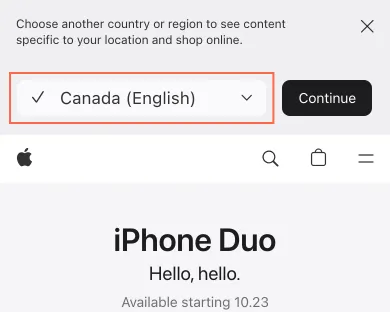
On first visits, on every page at 390px, the banner reads “Choose another country or region to see content specific to your location and shop online.” It stacks a ticked “Canada (English)” menu, “Continue” and a close X, about 135px tall. The page beneath shows US prices, such as “$1200, $930 or $350”, with no currency code, and the footer says “United States”.
Implication
The tick looks like the current setting, yet the content is US. A visitor may not know whether prices are in Canadian dollars, and on small phones the product starts lower down the first screen.
Recommendation
Say what will change: “You are viewing the US store. Switch to Canada (English)?” Show it as one compact row. Make the close control at least 44px.
Measured
- Canada (English): 255.4 × 42 px, touch minimum 44
- Continue: 89.6 × 36 px, touch minimum 44
- Close country or region sel…: 18 × 18 px, touch minimum 44
- First visits, 26 Oct: ‘✓ Canada (English)’ over prices with no currency code
Finding 2Medium
The Trade In panel’s close button is named ‘Learn more, Apple Trade In’
Observation
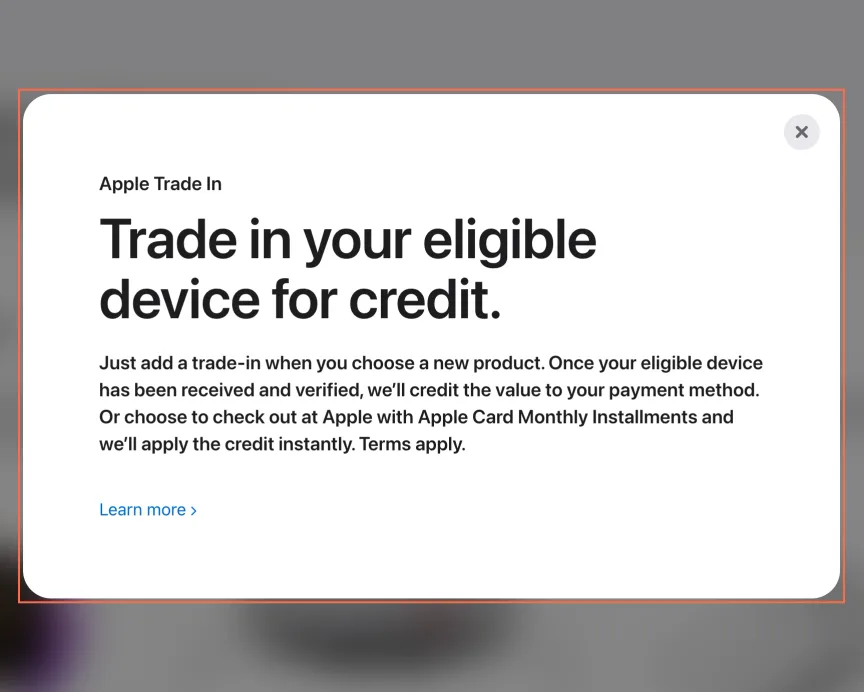
On /watch the Apple Trade In panel keeps keyboard focus inside it on 26 October: Tab moves between its link and its close button. On 19 October Tab left it for the page behind. The ‘Learn more’ link and the × close button both have the aria-label ‘Learn more, Apple Trade In’, so a screen reader gives close and the link one name.
Implication
A screen reader user hears two controls with the same name and cannot tell which one closes the panel. Pressing the wrong one opens the Trade In page instead of closing the panel.
Recommendation
Name the close button ‘Close’ and keep ‘Learn more, Apple Trade In’ on the link only. Fix it once in the shared modal component, which appears 14 times on Watch and Mac.
Measured
- Trade In dialog, 26 Oct: focus stays in; close and link share one name
- Trade In dialog, 19 Oct: Tab left it; Escape closed it and returned focus
Finding 3Low
The top navigation does not show which section you are in
Observation
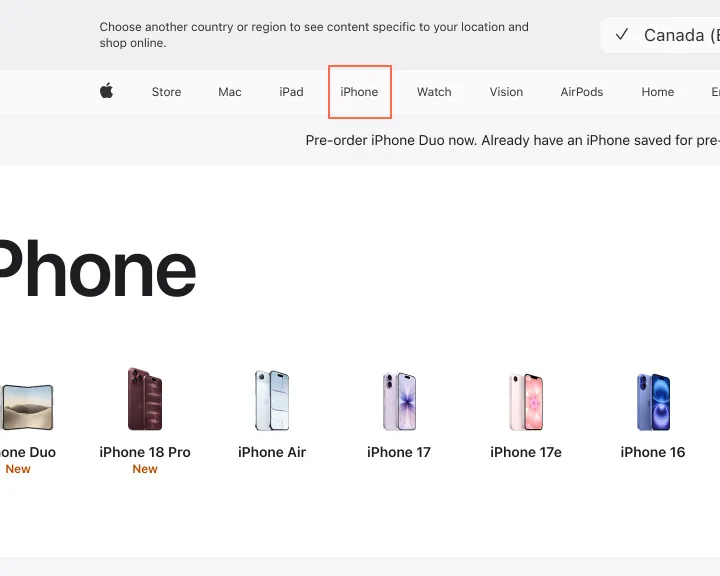
On /iphone, /mac, /ipad, /watch and /airpods, the current item in the top bar (“iPhone”, “Mac”, “iPad” and so on) looks the same as “Store”. The sub-navigation on AirPods 5 and Apple HomeView behaves the same way. No aria-current appears in the accessibility tree.
Implication
In a family of near-identical pages, a visitor deep in a product page has no cue to where they are, and a screen reader user gets no “current page” announcement.
Recommendation
Mark the current item with aria-current="page" and a quiet visual cue, such as a heavier weight or a thin underline. Do the same in the local navigation.
Measured
- iPhone: 4 role=section, no aria-current, footnotes 6 x 20px
- Nav: current item "iPhone" not marked
- Nav: current item "Mac" not marked
Finding 4Low
One destination is “Home” on most pages and “TV & Home” on others
Observation
The global navigation links “Home” (/home/) on the pages examined, but “TV & Home” (/tv-home/) on Find a Store.
Implication
A label that changes between pages makes people wonder whether there are two destinations.
Recommendation
Pick one label and one address, serve it from the shared header and footer, and redirect the other. Add a check that compares the nav label list across a sample of pages.
Measured
- Nav: "TV & Home" on Find a Store, "Home" elsewhere
Finding 5Medium
Gallery and accordion markup uses roles and list structures that do not exist
Observation
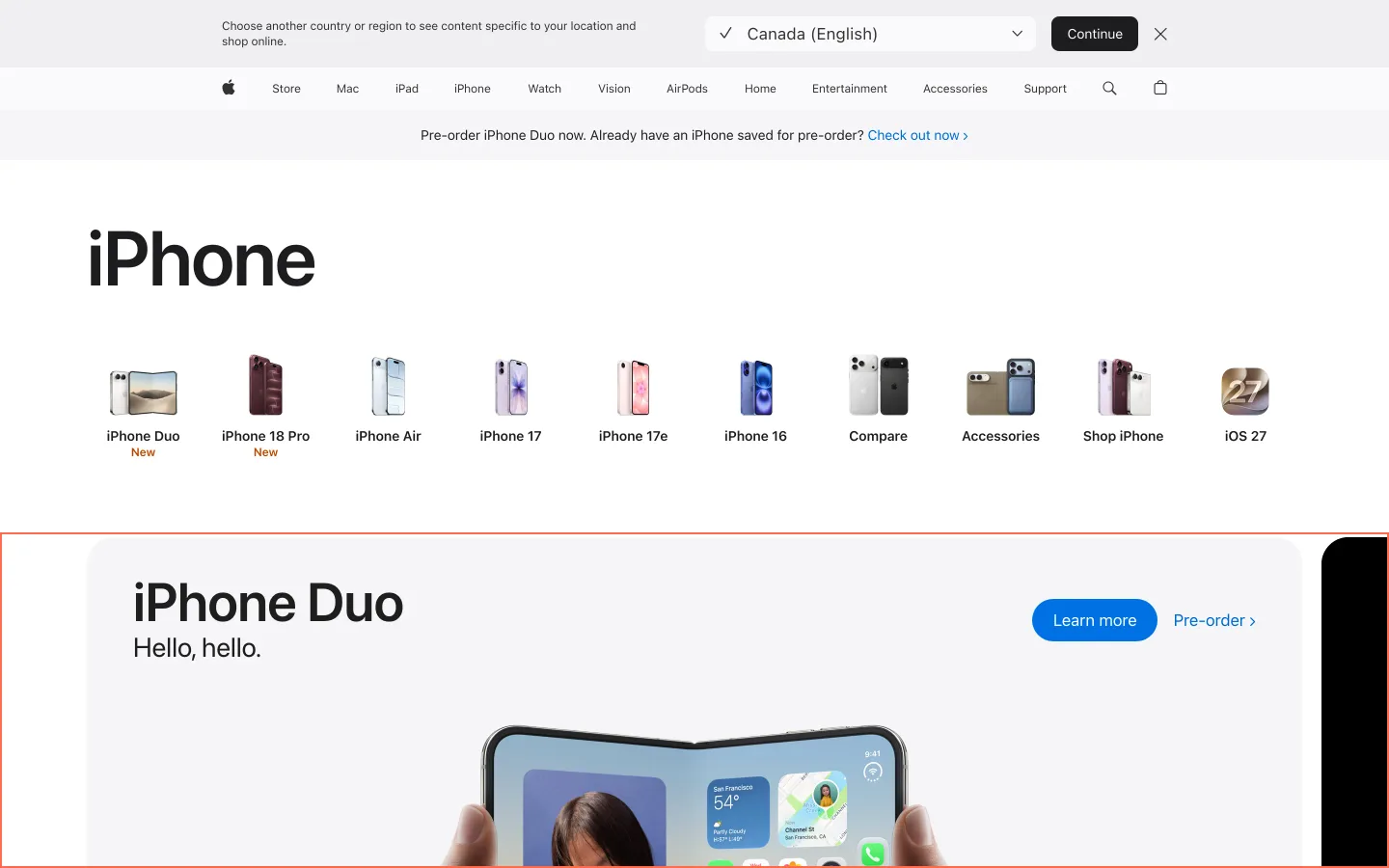
On the home page each media gallery is a list with no items: its ‘ul role=list’ holds 9 ‘role=tabpanel’ children, 18 panels in all, and only the first gallery has tabs (9). On /iphone 4 elements have role="section", an abstract role that assistive technology ignores. The iPhone gallery had the same list structure on 19 October and not on 26 October.
Implication
A screen reader announces lists with no items and tab panels with no tabs, so a listener cannot tell how many slides a gallery has or reach them in order.
Recommendation
Remove role="section" (use a plain section or region with a label), put list items directly inside lists, and run axe in the page build so the shared components stop reaching production.
Measured
- axe aria-required-children: 2 elements (critical)
- Home, 26 Oct: 18 tab panels in 2 lists, 9 tabs; /iphone: 4 role="section"
- iPhone: 4 role=section, no aria-current, footnotes 6 x 20px
- axe aria-roles: 2 elements (critical)
Finding 6Best practice
Phone links and buttons fall short of the 24 px minimum and Apple’s own 44-point guidance
Observation
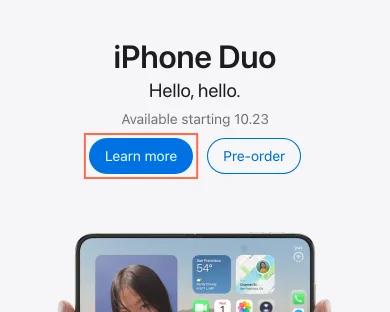
At 390px, the “Learn more” and “Buy” pills are 36px tall; the “Pre-order” text link in the iPhone Duo card is 18px; “Compare all models” is 16px; the banner close control is 18px. They sit next to one another in rows. The axe target-size nodes on these pages are the 22 px keyboard-only navigation triggers covered by the exemption on this page; the phone pills measure 36 px.
Implication
Fingers miss, especially on the way to “Buy” next to “Learn more”. Missed taps cost most where a visitor is ready to buy.
Recommendation
Make buttons and links at least 44px tall on touch screens, by padding rather than by enlarging the type. Give “Compare all models” the weight of a button, since comparing is a main path on the iPhone page.
Measured
- Learn more, iPhone Duo: 104.3 × 36 px, touch minimum 44
- Pre-order, iPhone Duo: 93.9 × 36 px, touch minimum 44
- Compare all models: 135.8 × 16 px, touch minimum 44
- Pre-order, iPhone Duo: 71.3 × 18 px, touch minimum 44
Finding 7Low
iPhone prices carry two or three payment schemes, with tiny footnote links
Observation
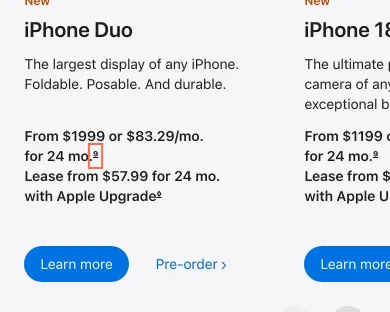
The lineup cards read “From $1999 or $83.29/mo. for 24 mo.”, and four of the six add “Lease from $57.99 for 24 mo. with Apple Upgrade” or similar. Each line ends in a footnote link 6 x 20px. On a phone, carrier and financing terms run on at length before the footer links.
Implication
Someone comparing phones reads a different price formula on each card, and cannot easily tap a footnote. Order Status, Contact Apple and Genius Bar sit in the footer, far below on a phone.
Recommendation
Lead with one price, and show the monthly and lease options on the product page. Make footnote marks at least 24px tap targets with a hover state. Collapse the carrier terms behind one “Terms” disclosure per offer, so the footer is within reach.
Measured
- iPhone: 4 role=section, no aria-current, footnotes 6 x 20px
- Footnote 9: 5.3 × 16 px, touch minimum 44
- Footnote ◊ symbol: 5.2 × 16 px, touch minimum 44
Finding 8Medium
Grey body copy on product pages measures 3.62:1
Observation
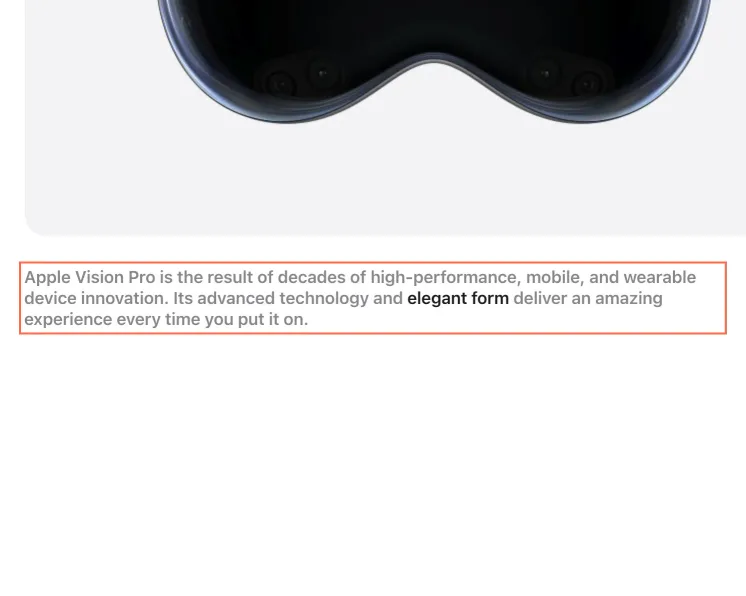
On Apple Vision Pro and AirPods 5 the paragraphs that explain each feature are grey #86868b on white, with a few words in near-black: 3.62:1 at 17 px on desktop and 14 px on phones, weight 600, under the 4.5:1 of WCAG 2.2 criterion 1.4.3 (AA). The genre lines on Services use the same grey at 14 px; they are aria-hidden, so only sighted readers meet them.
Implication
People with low vision, and anyone reading a phone in daylight, have to work to read the copy that explains what the product does. Only the highlighted words come through easily.
Recommendation
Darken the body grey to #6e6e73 or darker (5.07:1 on white), which keeps the two-tone effect, with the near-black highlight still standing out.
Measured
- axe color-contrast: 23 elements (serious)
- axe color-contrast: 1 element (serious)
- axe color-contrast: 20 elements (serious)
- Live, 26 Oct: #86868b on #fff, 3.62:1, 17 px at 1440 and 14 px at 390
Finding 9Medium
Hidden controls that still take keyboard focus
Observation
On Services and AirPods at tablet and phone sizes, the arrow buttons that scroll the strip under the navigation have aria-hidden="true" but stay focusable. On Services on 26 October a Tab press landed on one, 34 × 100 px, and drew a focus ring. On Apple HomeView at 390 px the product viewer’s controls are aria-hidden and transparent, and 6 Tab stops in a row showed nothing.
Implication
A keyboard user lands on a control that a screen reader does not announce, or on one they cannot see, and has no idea where focus went. On HomeView this happens inside the product’s own feature tour.
Recommendation
Take the paddles out of the tab order (tabindex="-1", or disabled when there is nothing to scroll), or drop aria-hidden and give them names. Make the hidden viewer panels inert until they are shown.
Measured
- axe aria-hidden-focus: 1 element (serious)
- Services, 26 Oct: a Tab press lands on an aria-hidden paddle and draws a ring
- axe aria-hidden-focus: 5 elements (serious)
- HomeView at 390, 26 Oct: 6 Tab stops on invisible or off-screen controls
Finding 10Low
Find a Store opens on three US stores for a visitor in Toronto
Observation
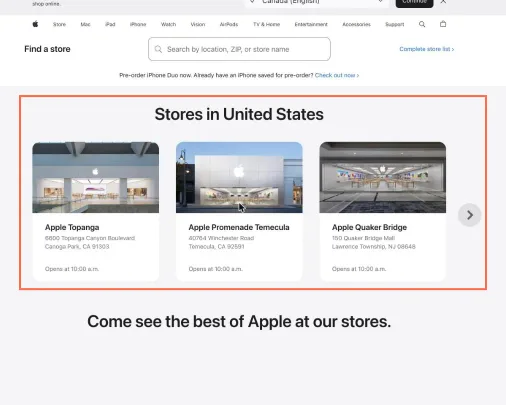
On /retail the heading reads “Stores in United States” and shows three stores that change on each visit (for example Canoga Park CA, Temecula CA and Lawrence Township NJ), each “Opens at 10:00 a.m.”, while the banner above offers Canada. The hint reads “Search by location, ZIP, or store name”. There is no “use my location” control.
Implication
The page is meant to answer “where is my nearest store”. Three arbitrary cities do not, and a visitor outside the US may not know whether a ZIP is what they need.
Recommendation
Default the gallery to the nearest stores for the detected region, or say plainly that the three shown are examples. Offer a “Use my location” button beside the field, word the hint by region (“postal code” for Canada), and shorten the hint so it fits at 390px.
Measured
- Find a Store from Canada: "Stores in United States", three US stores
What was examined
- Home
- Entertainment
- AirPods
- iPhone
- Apple Watch
- Apple Vision Pro
- Smart home
- iPad
- Mac
- Services
- AppleCare
- Find a store
- AppleCare, Vision Pro filter and 7 more built the same way
- AirPods 5
- Apple HomeView
The sitemap lists 19852 more pages the site does not link to; they were listed, not read.
No real users were observed. Only public pages were examined, signed out, on the date shown, at the sizes listed. A browser took the measurements; the numbers are in each finding.
Automated checks
| Accessibility rules failed (axe) | 7 rules: 2 critical, 5 serious |
|---|---|
| Tap targets under 24 pixels | 68 |
| Links that open a new tab | 16 |
| Console errors on load | 0 |
The 7 rules, by impact, with the elements and pages each failed on
aria-required-childrencriticalWCAG 1.3.1 Info and Relationships (A) · 5 elements on 4 pages: Home; iPhone; AirPods 5; Apple HomeView
aria-rolescriticalWCAG 4.1.2 Name, Role, Value (A) · 4 elements on 3 pages: iPhone; AirPods 5; Apple HomeView
target-sizeseriousWCAG 2.5.8 Target Size (Minimum) (AA) · 165 elements on 15 pages: Home; Entertainment; AirPods; iPhone; Apple Watch; Apple Vision Pro; Smart home; iPad; Mac; Services; AppleCare; Find a store; AppleCare, Vision Pro filter; AirPods 5; Apple HomeView
target-size: not counted against the level, because The failing targets are keyboard-only disclosure buttons whose function the 44 px navigation link performs on hover (2.5.8 Equivalent exception), and a 1 px hidden duplicate of the local-nav toggle. Verified live 2026-10-26.
color-contrastseriousWCAG 1.4.3 Contrast (Minimum) (AA) · 99 elements on 7 pages: Home; Entertainment; Apple Vision Pro; Services; AppleCare; AppleCare, Vision Pro filter; AirPods 5
color-contrast: not counted against the level, because The failing nodes are the labels of the gallery slides that are not current, dimmed to 0.36 opacity while another slide is shown; the current slide’s label measures 19.29:1 (26 October).
label-content-name-mismatchseriousWCAG 2.5.3 Label in Name (A) · 32 elements on 15 pages: Home; Entertainment; AirPods; iPhone; Apple Watch; Apple Vision Pro; Smart home; iPad; Mac; Services; AppleCare; Find a store; AppleCare, Vision Pro filter; AirPods 5; Apple HomeView
label-content-name-mismatch: not counted against the level, because The bag link has no visible text; the other names begin with their visible label and add a footnote marker or a description.
aria-hidden-focusseriousWCAG 4.1.2 Name, Role, Value (A) · 11 elements on 6 pages: Entertainment; AirPods; Services; AppleCare; AppleCare, Vision Pro filter; Apple HomeView
listseriousWCAG 1.3.1 Info and Relationships (A) · 1 element on 1 page: Find a store
Counted by the engine on every page examined, at all three sizes.