UX heuristic analysis · Telecom and health
Verizon.com: a UX heuristic analysis
For Verizon’s digital product team
- Assessed
- Published
- Examined
- 11 pages of verizon.com at desktop (1440 px), tablet (820 px) and phone (390 px)
- Method
- 11 public pages of verizon.com, read signed out at three sizes (1440 × 900, 820 × 1180, 390 × 844) in headful Google Chrome on 2026-10-25, through the engine's own resolver; measured with axe-core and the engine's own checks. The pages were read in one session in the order listed, so pages read after the iPhone 18 Pro page carry what the site remembered of that visit. The cart was not read: robots.txt disallows its addresses, and it holds nothing until a phone is added. 'Plan comparison' is Verizon's page comparing its plans with other carriers', not a comparison of Verizon's own plans. The explorer sends no writes and types into no address field; reviewed from Toronto, Canada
Summary
Verizon.com's plan controls have wrong names or none, and red text on the home and plans pages misses contrast
On Unlimited plans the 16 px 'Max 12 lines' information button has no name, and plan cards are named with words they do not show, such as 'Keep your own phone' for 'Bring your own phone'. Red text on the home page's quick links and the plans page's savings lines measures 4.16 to 4.24:1, under the 4.5:1 WCAG asks for. Smaller: a store locator field with no visible focus, a carousel that keyboard users cannot move, and invalid ARIA on the return policy page. Seen from Toronto, Canada.
Where to start
- Finding 3: On the plans page the 'Max 12 lines' information button has no name Medium
- Finding 4: Plan cards read 'Bring your own phone' but are named 'Keep your own phone' Medium
- Finding 1: The home page's quick links and the plans page's savings miss text contrast Medium
- Finding 2: On phones the home page's cash-offer carousel has no usable Previous and Next buttons Medium
- Finding 5: The store locator's 'Enter ZIP code or city, state' field shows no focus Low
| High | Medium | Low | Best practice |
|---|---|---|---|
| 0 | 4 | 2 | 0 |
The 6 findings
Findings about the whole site first, then each page in the order examined, the most severe first within each. The levels, high, medium, low, best practice, are explained on the method page.
Finding 1Medium
The home page's quick links and the plans page's savings miss text contrast
Observation
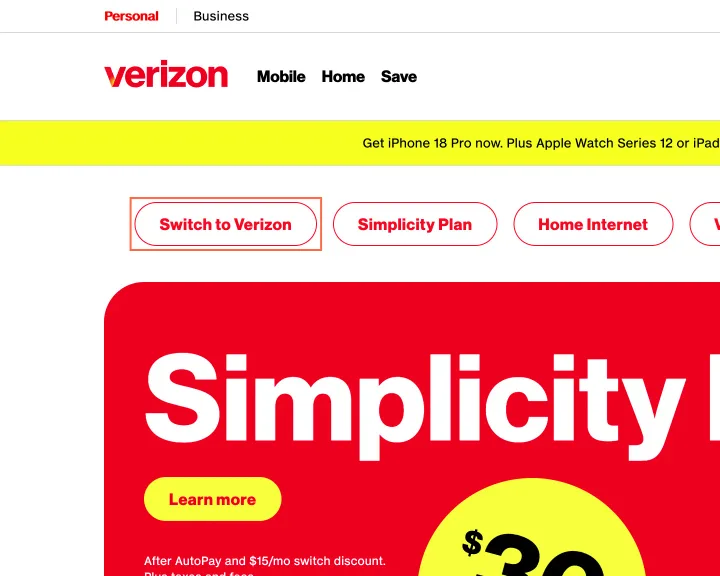
The home page's 6 quick links ('Switch to Verizon', 'Home Internet'…) are red #f50a23 on white, 4.24:1. The yellow 'Learn more' and 'Check availability' buttons are red #ee001e on #f8ff3c, 4.16:1. On Unlimited plans the 12 px savings lines ('Save $16.97/mo') use the same red on yellow. 9 elements on the home page are under the 4.5:1 of WCAG 1.4.3 (AA), measured on 26 October.
Implication
The 12 px savings lines state the price difference between plans, and they fail by the widest margin for people with low vision or a phone screen in sunlight.
Recommendation
Darken the brand red used for text to #d52b1e or darker on white and on the yellow, enough for 4.5:1, and set the savings lines at 14 px. Keep the brighter red for fills and large display type, where 3:1 is enough.
Measured
- axe color-contrast: 9 elements (serious)
- axe color-contrast: 11 elements (serious)
- 26 Oct: 4.24:1 and 4.16:1; 12 px savings lines at 4.16:1; 9 on home
Finding 2Medium
On phones the home page's cash-offer carousel has no usable Previous and Next buttons

Observation
At 390 px the home page's 'Monthly cash' carousel (Monthly cash, Daily deals, Weekly wins, Freebies) holds 824 px of offers in a 358 px box. Its Previous and Next buttons are drawn 0 × 0 and the box itself takes no focus, so a keyboard user cannot move it; axe scrollable-region-focusable (serious, WCAG 2.1.1) fails on it. It is a promotion, off the plan and phone paths.
Implication
Keyboard users see only the first offers in the carousel and cannot reach the rest.
Recommendation
Show the Previous and Next buttons at every width, or make the scroll area focusable with tabindex="0" and a name.
Measured
- axe scrollable-region-focusable: 1 element (serious)
- 26 Oct at 390 px: 824 px in a 358 px box; Previous and Next are 0 × 0
Finding 3Medium
On the plans page the 'Max 12 lines' information button has no name
Observation
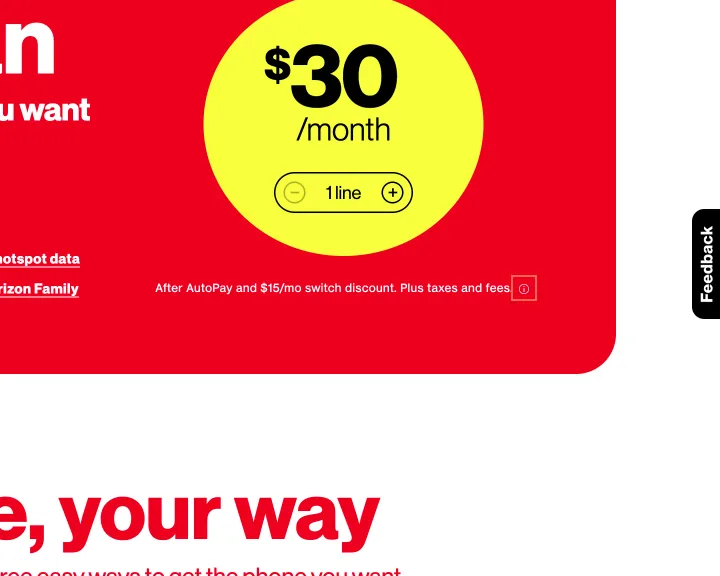
On Unlimited plans, a 16 × 16 px information button beside the plan details, whose tooltip begins 'Max 12 lines. $10/mo…', has no label, aria-label or title at all three sizes. axe button-name (critical, WCAG 4.1.2) fails on it. The FAQ wrapper under 'Have questions? We've got answers.' has aria-expanded='undefined'; axe aria-allowed-attr (critical, 4.1.2) fails on it.
Implication
A screen reader announces only 'button', so a listener cannot tell that it holds the line limit and price for extra lines, terms that change what a plan costs. The invalid attribute can make the FAQ read as collapsed when it is not.
Recommendation
Name the button by what it explains, 'More about line limits', with aria-expanded on the button. Remove aria-expanded from the FAQ wrapper and keep it on each question's button, set to true or false.
Measured
- axe button-name: 1 element (critical)
- Button: no accessible name
- axe aria-allowed-attr: 1 element (critical)
- 26 Oct: 16 px 'Max 12 lines' button unnamed; FAQ aria-expanded="undefined"
Finding 4Medium
Plan cards read 'Bring your own phone' but are named 'Keep your own phone'
Observation
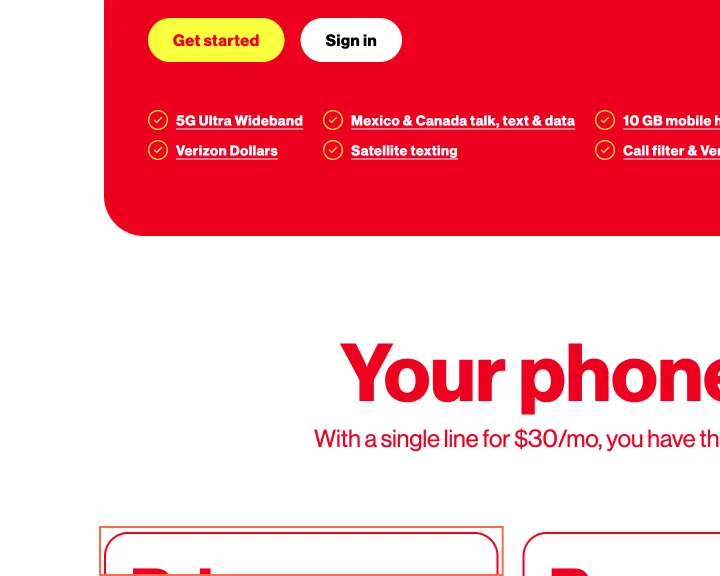
On Unlimited plans the first 'Your phone, your way' card shows 'Bring your own phone' but is named 'Keep your own phone', and is a link to '#' with role='button'; axe label-content-name-mismatch (serious, WCAG 2.5.3) fails on all three cards. On Home internet, 'Link accounts' is named 'Frontier is now part of the Verizon Family' and 'Sign in' 'Are you a Verizon customer?'.
Implication
A voice control user who says 'click Bring your own phone' gets no match, and the card for keeping a phone, a main way into a plan, cannot be reached by its words. A link to '#' acting as a button can confuse keyboard and screen reader users.
Recommendation
Drop the aria-labels and let the visible text name each card and link, or start each name with its visible words. Make the first card a real <button> that opens its sign-in dialog.
Measured
- axe label-content-name-mismatch: 3 elements (serious)
- axe label-content-name-mismatch: 2 elements (serious)
- 26 Oct: 'Bring your own phone' named 'Keep your own phone'
Finding 5Low
The store locator's 'Enter ZIP code or city, state' field shows no focus
Observation
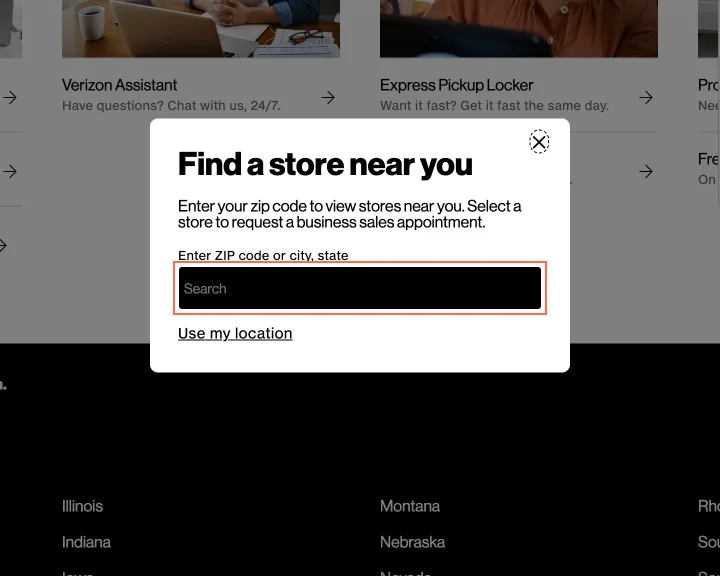
At 1440 px the store locator's 'Enter ZIP code or city, state' field looks the same focused as not: no outline, shadow, border or background change. The same field in the 'Book a business sales appointment' panel does the same. Its text is 14 px at 1440 and 390 px, under the 16 px at which iOS zooms the page on focus.
Implication
A keyboard user cannot see that they have reached the one field the page exists for. On an iPhone the page zooms in when the field is tapped and must be zoomed back out to see the results.
Recommendation
Give the field a 2 px focus outline with 3:1 contrast, the same in the appointment panel. Set its text to 16 px at every size.
Measured
- 26 Oct: ZIP field focused, no visible change; text 14 px
- Book a business sales…: Enter ZIP code or city,… no focus indicator
- Enter ZIP code or city, sta…: font-size 14 px
Finding 6Low
The return policy page's tabs and breadcrumb carry invalid ARIA
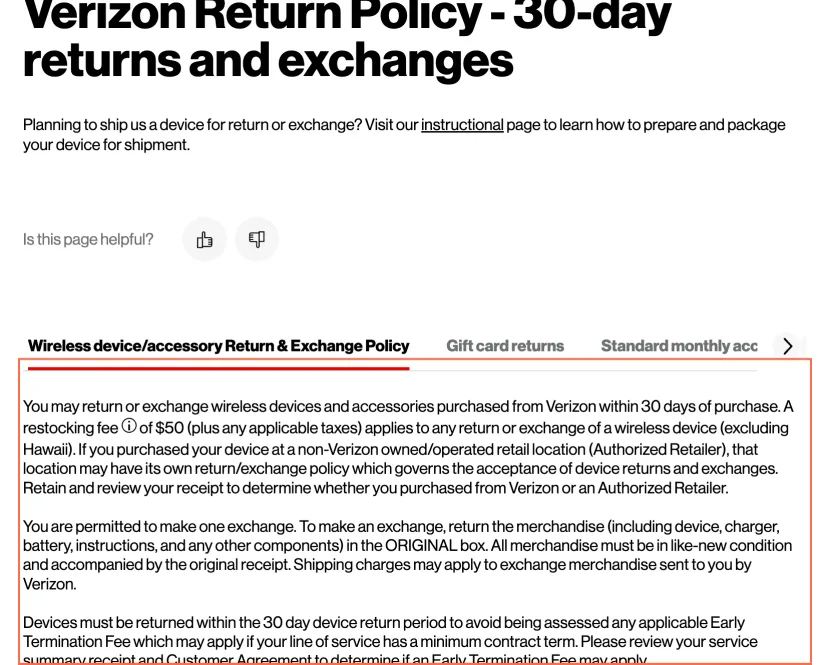
Observation
On Return policy the visible tab panel has role="region" with aria-selected="true", which that role does not allow (axe aria-allowed-attr, critical, WCAG 4.1.2). The breadcrumb puts span role="listitem" inside each link, outside any list (axe aria-required-parent, critical, 1.3.1). Both fail at all three sizes.
Implication
Screen readers may misreport the policy's tabs and the breadcrumb's structure. The policy text still reads.
Recommendation
Remove aria-selected from the panel, or give it role="tabpanel" inside a real tab list, and drop role="listitem" from the breadcrumb spans so each li is the list item.
Measured
- axe aria-allowed-attr: 1 element (critical)
- axe aria-required-parent: 1 element (critical)
- 26 Oct: role="region" with aria-selected; listitem spans inside links
What was examined
- Home
- Plans: Unlimited
- Phone: Apple iPhone 18 Pro
- Plan comparison
- Deals: phone deals
- Home internet: availability check
- Store locator
- Coverage map
- Support: contact us
- Return policy
- Accessibility
No real users were observed. Only public pages were examined, signed out, on the date shown, at the sizes listed. A browser took the measurements; the numbers are in each finding.
Automated checks
| Accessibility rules failed (axe) | 10 rules: 3 critical, 7 serious |
|---|---|
| Tap targets under 24 pixels | 55 |
| Links that open a new tab | 63 |
| Console errors on load | 70 |
The 10 rules, by impact, with the elements and pages each failed on
aria-allowed-attrcriticalWCAG 4.1.2 Name, Role, Value (A) · 2 elements on 2 pages: Plans: Unlimited; Return policy
aria-required-parentcriticalWCAG 1.3.1 Info and Relationships (A) · 1 element on 1 page: Return policy
button-namecriticalWCAG 4.1.2 Name, Role, Value (A) · 1 element on 1 page: Plans: Unlimited
color-contrastseriousWCAG 1.4.3 Contrast (Minimum) (AA) · 20 elements on 2 pages: Home; Plans: Unlimited
label-content-name-mismatchseriousWCAG 2.5.3 Label in Name (A) · 13 elements on 5 pages: Plans: Unlimited; Phone: Apple iPhone 18 Pro; Home internet: availability check; Support: contact us; Accessibility
listitemseriousWCAG 1.3.1 Info and Relationships (A) · 7 elements on 1 page: Phone: Apple iPhone 18 Pro
listitem: not counted against the level, because On the iPhone 18 Pro page at 820 px in the 25 October capture. Not reproduced on 26 October at 1440, 820 or 390 px, after expanding Overview and Specs: no list item was outside a list. Re-check at the next capture.
target-sizeseriousWCAG 2.5.8 Target Size (Minimum) (AA) · 3 elements on 2 pages: Phone: Apple iPhone 18 Pro; Coverage map
target-size: not counted against the level, because Two legal links on the iPhone 18 Pro page at 820 px in the 25 October capture, and one control on the coverage map. On 26 October the phone page had no ‘Network Management’ link, and its only ‘Privacy Policy’ link was the footer one, 85 × 40 px.
frame-titleseriousWCAG 4.1.2 Name, Role, Value (A) · 1 element on 1 page: Coverage map
listseriousWCAG 1.3.1 Info and Relationships (A) · 1 element on 1 page: Phone: Apple iPhone 18 Pro
list: not counted against the level, because On the iPhone 18 Pro page at 820 px in the 25 October capture. Not reproduced on 26 October at 1440, 820 or 390 px, after expanding Overview and Specs: no list held anything but list items. Re-check at the next capture.
scrollable-region-focusableseriousWCAG 2.1.1 Keyboard (A); WCAG 2.1.3 Keyboard (No Exception) (AAA) · 1 element on 1 page: Home
scrollable-region-focusable: not counted against the level, because The home page’s cash-offer carousel, a promotion off the plan and phone paths: levelled low as f6 (WCAG 2.1.1) under the 2026-10-25 ruling that a promotion on a primary page is off the primary task path.
Counted by the engine on every page examined, at all three sizes, in headful Chrome.