UX heuristic analysis · Banks and insurers
TD.com: a UX heuristic analysis
For TD’s digital product team
- Assessed
- Published
- Examined
- 12 pages of TD at desktop (1440 px), tablet (820 px) and phone (390 px)
- Method
- 12 public pages, read signed out at three sizes (1440 × 900, 820 × 1180, 390 × 844) in headless Chromium on 2026-10-27; measured with axe-core and the engine's own checks, every finding checked by hand; reviewed from Toronto, Canada
Summary
TD.com's sign-in page turns off zoom, and a chequing button is named for a Starbucks offer
The EasyWeb sign-in page sets user-scalable = no, its Login Help links measure 4.27:1, and its phone menu reports aria-expanded 'false' while open. On the TD Unlimited Chequing page a 'Get started' button is named 'Earn 50% more Stars at Starbucks Learn more', and closed FAQ answers on the GIC page still take keyboard focus. On a phone the privacy notice covers 427 of 844 px, and its preferences open with Performance and Targeting switched on. axe found 8 rules failing across 12 pages at 3 sizes, seen from Toronto, Canada.
Where to start
- Finding 4: A 'Get started' button on the chequing page is named for a Starbucks offer Medium
- Finding 9: The EasyWeb sign-in page turns off pinch zoom Medium
- Finding 10: The Login Help links on the sign-in page measure 4.27:1 Medium
- Finding 11: On a phone the sign-in page's menu buttons say 'collapsed' while their menus are open Medium
- Finding 5: Closed FAQ answers on the GIC rates page still take keyboard focus Medium
| High | Medium | Low | Best practice |
|---|---|---|---|
| 0 | 6 | 4 | 1 |
The 11 findings
Findings about the whole site first, then each page in the order examined, the most severe first within each. The levels, high, medium, low, best practice, are explained on the method page.
Finding 1Low
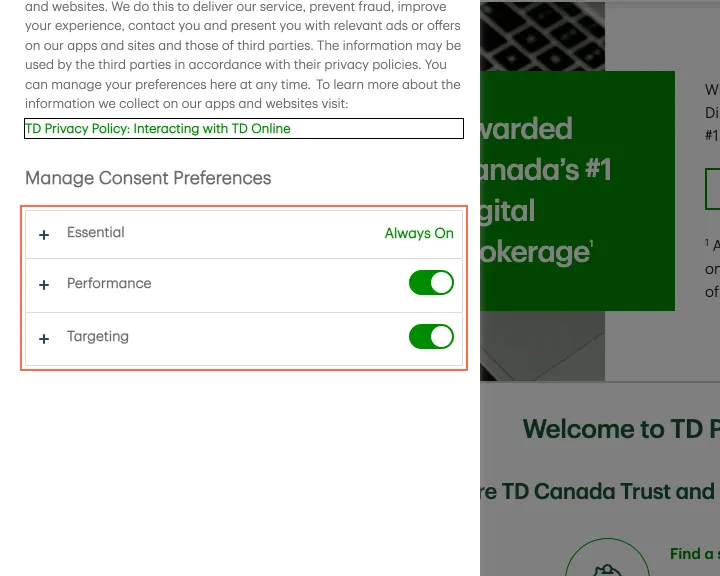
The privacy preferences open with Performance and Targeting switched on
Observation
Pressing 'Manage online experience' opens 'Manage Preferences' with Performance and Targeting switched on before the visitor has chosen anything. The notice and the panel offer 'Accept all' and 'Confirm My Choices', and no button that declines both in one step.
Implication
A person who opens the panel to refuse tracking must find and switch off 2 toggles, and one who presses Confirm My Choices without reading agrees to targeting.
Recommendation
Start Performance and Targeting switched off, and add a 'Reject all' button beside 'Accept all' in the notice and in the panel.
Measured
- Performance and Targeting on before any choice
- No reject-all button in the notice or the panel
Finding 2Low
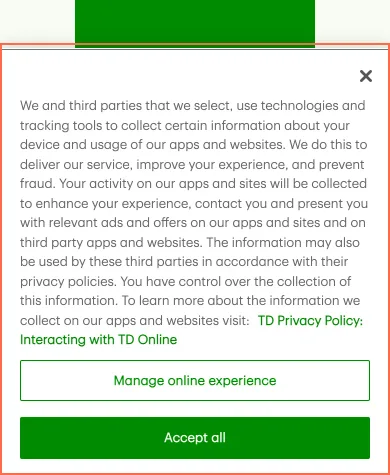
On a phone the privacy notice covers half the screen and the open menu
Observation
At 390 × 844 the privacy notice is 427 px tall on the home page and 407 px on sign-in. On home it covers the hero's Open an account button. It is drawn above everything else on the page, so it also covers the lower half of the open menu.
Implication
On a first visit, people on a phone see half a page until they answer the notice. Some accept tracking to clear the screen.
Recommendation
On phones, show one or two lines with 'Accept all', a decline button and 'Manage online experience' side by side, with the full text in the panel. Let the open menu and dialogs cover the notice.
Measured
- Privacy notice: 390 × 427 px of the 844 px screen
- Overlap: 360 × 42 px (15120 px²)
- Sign-in, 390 px: notice covers the open menu
Finding 3Best practice
Footer links open a new tab with no icon and nothing in their names
Observation
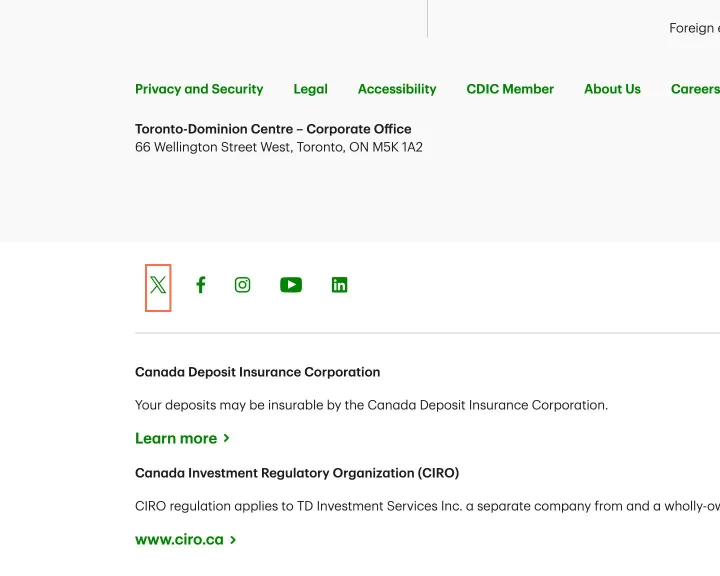
On every page the footer's social links, 'DEPOSIT PROTECTION DES DEPOTS' and 'Regulated by CIRO' open a new tab, with no icon and nothing in their names.
Implication
Screen reader and phone users find that Back no longer returns them to the TD page they were reading.
Recommendation
Add a new-tab icon and visually hidden '(opens in new tab)' to these links, or open them in the same tab.
Measured
- Twitter: opens a new tab, no cue
- DEPOSIT PROTECTION DES DEPO…: opens a new tab, no cue
- Regulated by CIRO: opens a new tab, no cue
Finding 4Medium
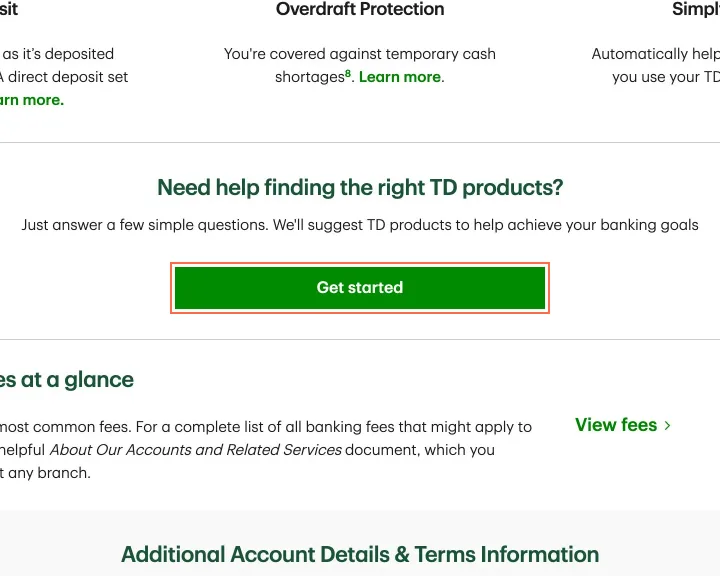
A 'Get started' button on the chequing page is named for a Starbucks offer
Observation
On the TD Unlimited Chequing page the 'Get started' button that opens the product selector has the name 'Earn 50% more Stars at Starbucks Learn more'. axe reports label-content-name-mismatch at all three sizes. On the mobile app page the Google Play badge is named 'android_app'.
Implication
A screen reader announces a Starbucks promotion for the button that starts choosing an account. A voice-control user who says 'Get started' does not reach it. The Google Play link is read as a file name.
Recommendation
Remove the aria-label so the visible 'Get started' is the name, or start the label with it. Give the Google Play image alt 'Get it on Google Play', matching the App Store badge.
Measured
- 'Get started' named 'Earn 50% more Stars at Starbucks…'
- axe label-content-name-mismatch: 1 element (serious)
- Google Play badge: alt 'android_app'
Finding 5Medium
Closed FAQ answers on the GIC rates page still take keyboard focus
Observation
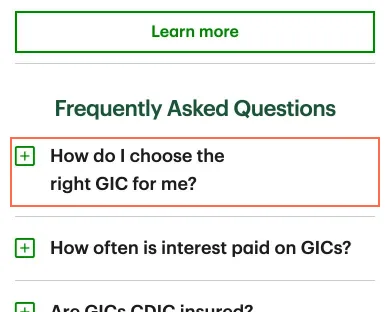
At 390 px a closed FAQ answer is 0 px tall and aria-hidden, but not inert. On GIC rates, Tab reaches the 'GIC selector tool' link inside the closed answer to 'How do I choose the right GIC for me?'. axe reports aria-hidden-focus for the same accordion at 390 px on mortgage rates, compare accounts, the mobile app page and accessibility.
Implication
A keyboard user lands on a link they cannot see, and a screen reader user on one it does not announce, in the questions people read before choosing a GIC.
Recommendation
Make a closed panel inert, or hide it with display: none, and remove that when it opens. Fix it once in the shared accordion component.
Measured
- Closed FAQ: hidden 'GIC selector tool' link takes focus
- axe aria-hidden-focus: 1 element (serious)
- axe aria-hidden-focus: 2 elements (serious)
Finding 6Medium
Footnote links '2' and '3' in the mortgage rate table are 10 px tall
Observation
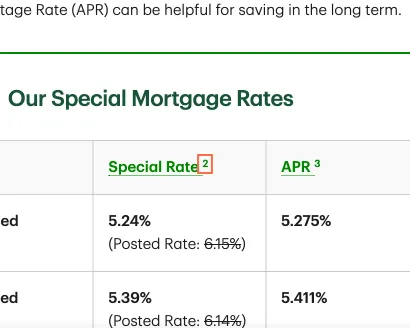
In the rate table on Today's Mortgage Rates, footnote links '2' and '3' measure 5.8 × 10 px and 6.2 × 10 px at 1440 px, 2.9 px and 3.1 px from the next link. axe reports target-size for them at all three sizes.
Implication
The notes these links open say how the advertised rate and APR are calculated. People with a tremor, or anyone on a touch screen, hit 'APR' or miss the link when they try to read them.
Recommendation
Pad each footnote link to at least 24 × 24 px, or space it 24 px from its neighbours. The same footnote component is used on the GIC and chequing pages.
Measured
- axe target-size: 3 elements (serious)
- Footnotes '2' and '3': 5.8 × 10 and 6.2 × 10 px
Finding 7Low
Each footnote on the mortgage rates page opens the same list of 11 notes
Observation
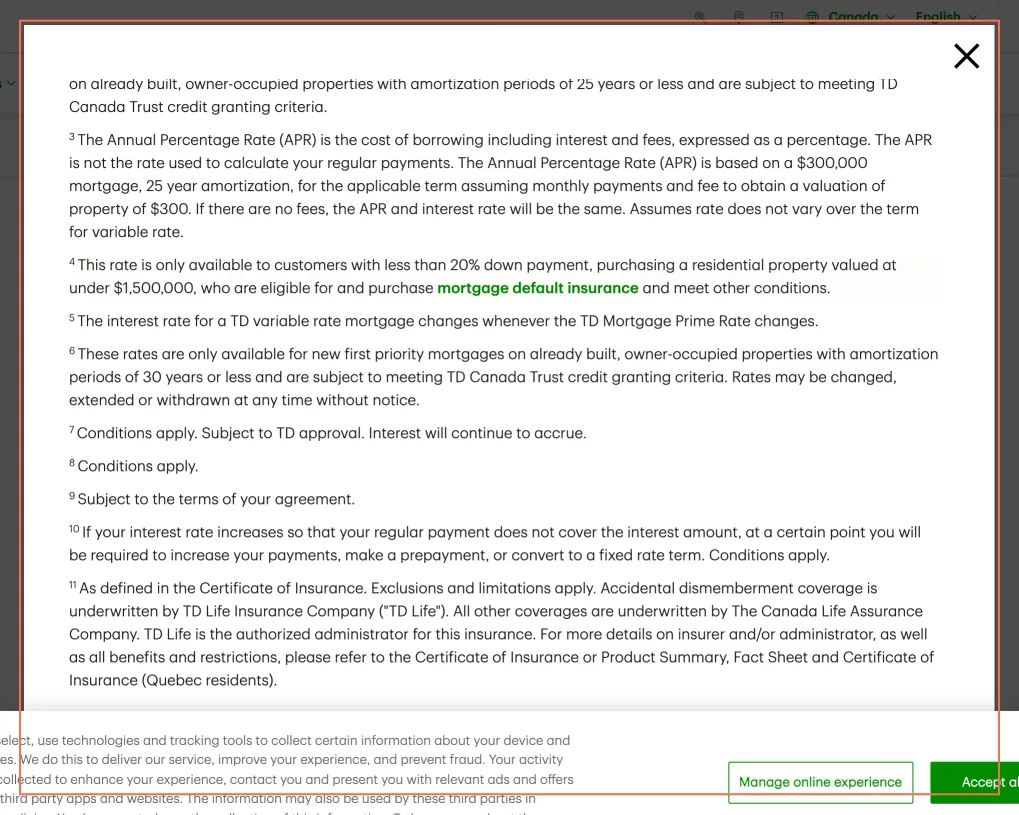
Footnote links on the mortgage rates page are named by their digit ('2', '4'). Each opens one dialog named 'Modal content', starting at note 1 and listing 11 notes, with nothing marking the one chosen. On compare accounts the same dialog scrolls to the chosen note.
Implication
People reading the conditions of a rate must remember the number they pressed and find it in a list, and a screen reader announces only the digit and "Modal content".
Recommendation
Scroll the dialog to the chosen note and highlight it, as compare accounts does. Name the dialog by its heading, and the links 'Footnote 2' and so on.
Measured
- State 2: 4 (button) used
- Footnote '2': 'Modal content' dialog of 11 notes from note 1
Finding 8Low
The branch locator opens on a "could not find" message before any search
Observation
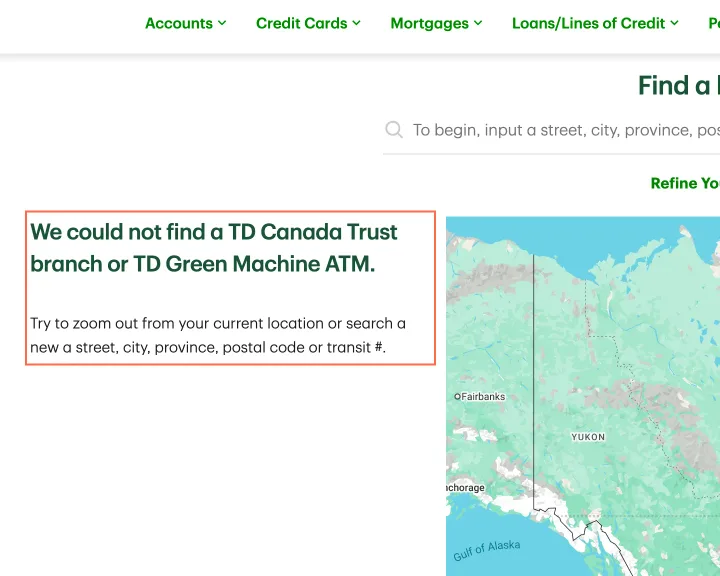
On load the locator shows 'We could not find a TD Canada Trust branch or TD Green Machine ATM.' beside a map of northern Canada, before anything is typed. It did the same in Chrome from Toronto on 27 October. The text below reads 'search a new a street'.
Implication
A person who came to find a branch is first told there is none, and some will leave without searching.
Recommendation
Show 'Enter a street, city, postal code or transit # to find branches and ATMs' until a search runs, and show the not-found message only when a search returns nothing. Correct 'a new a street'.
Measured
- 'We could not find a TD Canada Trust branch…' on load
Finding 9Medium
The EasyWeb sign-in page turns off pinch zoom
Observation
The EasyWeb sign-in page's viewport meta tag reads 'user-scalable = no'. axe reports meta-viewport at all three sizes. The home page and the other pages examined allow zoom.
Implication
In a browser that honours the tag, a person with low vision cannot enlarge the username field, the password field or the security text to check what they typed before signing in.
Recommendation
Remove 'user-scalable = no' from the viewport tag, and check that the sign-in form reflows at 200% zoom.
Measured
- viewport meta: user-scalable = no
- axe meta-viewport: 1 element (moderate)
Finding 10Medium
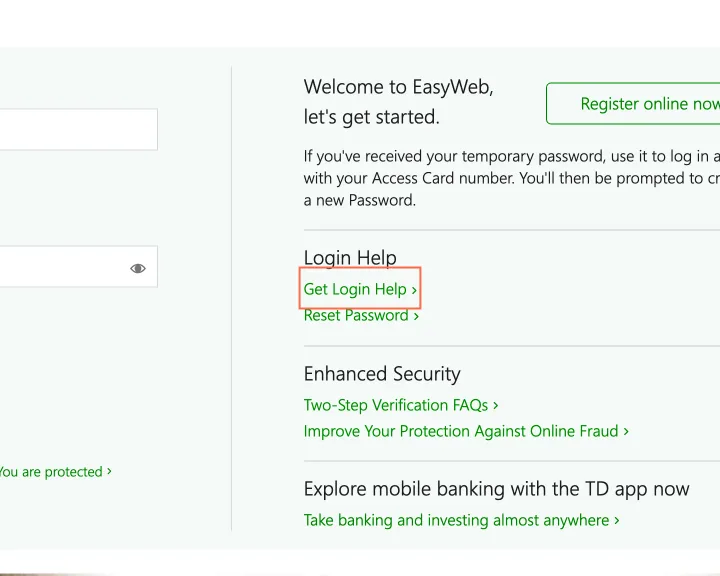
The Login Help links on the sign-in page measure 4.27:1
Observation
'Get Login Help', 'Reset Password', 'Two-Step Verification FAQs' and 'Improve Your Protection Against Online Fraud' are 16 px #008A00 on the panel's #F5F9F7: 4.27:1, under the 4.5:1 that text this size needs. axe reports color-contrast on 4 elements at 1440 px.
Implication
These are the links a person who cannot sign in needs. People with low vision, or on a phone in bright light, read them with difficulty at the moment they are locked out.
Recommendation
Use the darker green the page already uses for 'Forgot your username or password?' (#038203, 4.71:1 on the same panel) for every link in the Login Help and Enhanced Security panels.
Measured
- axe color-contrast: 4 elements (serious)
- Login Help links: #008A00 on #F5F9F7, 4.27:1
Finding 11Medium
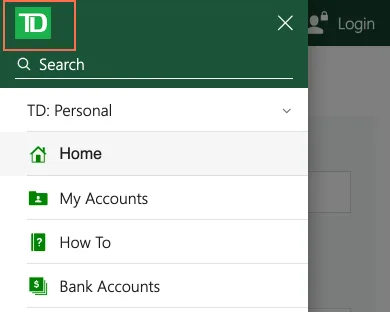
On a phone the sign-in page's menu buttons say 'collapsed' while their menus are open
Observation
At 390 px, pressing 'Open menu' on the sign-in page opens a full-height menu, and the button's aria-expanded stays 'false'. The capture recorded the same for 'Login Open menu'. On the same page 'Login Help' updates aria-expanded when it opens.
Implication
A screen reader user is told the menu is still collapsed after opening it, and cannot tell whether the press worked before moving into the panel.
Recommendation
Set aria-expanded to 'true' when each menu opens and back to 'false' when it closes, as the 'Login Help' disclosure on the same page does.
Measured
- Open menu TD Canada Trust: aria-expanded not updated
- 'Open menu': panel open, aria-expanded "false"
- Login Open menu: aria-expanded not updated
What was examined
- Home
- Chequing: TD Unlimited Chequing Account
- Compare bank accounts
- Credit cards
- Rates: GICs
- Mortgage rates
- Branch and ATM locator
- Sign in to EasyWeb
- Help centre
- Account fees
- Mobile app
- Accessibility
No real users were observed. Only public pages were examined, signed out, on the date shown, at the sizes listed. A browser took the measurements; the numbers are in each finding.
Automated checks
| Accessibility rules failed (axe) | 8 rules: 1 critical, 6 serious, 1 moderate |
|---|---|
| Tap targets under 24 pixels | 101 |
| Links that open a new tab | 97 |
| Console errors on load | 8 |
The 8 rules, by impact, with the elements and pages each failed on
image-altcriticalWCAG 1.1.1 Non-text Content (A) · 1 element on 1 page: Sign in to EasyWeb
image-alt: not counted against the level, because The one element is a zero-size tracking image added by a third-party script on the sign-in page; it is never shown, and it was not in the page on the live check (27 October).
aria-hidden-focusseriousWCAG 4.1.2 Name, Role, Value (A) · 8 elements on 6 pages: Compare bank accounts; Rates: GICs; Mortgage rates; Branch and ATM locator; Mobile app; Accessibility
target-sizeseriousWCAG 2.5.8 Target Size (Minimum) (AA) · 5 elements on 2 pages: Mortgage rates; Branch and ATM locator
color-contrastseriousWCAG 1.4.3 Contrast (Minimum) (AA) · 4 elements on 1 page: Sign in to EasyWeb
frame-titleseriousWCAG 4.1.2 Name, Role, Value (A) · 1 element on 1 page: Sign in to EasyWeb
frame-title: not counted against the level, because The one element is a one-pixel advertising-server iframe (adnxs.com) on the sign-in page, which no visitor sees or reaches; it was not in the page on the live check (27 October).
label-content-name-mismatchseriousWCAG 2.5.3 Label in Name (A) · 1 element on 1 page: Chequing: TD Unlimited Chequing Account
listseriousWCAG 1.3.1 Info and Relationships (A) · 1 element on 1 page: Credit cards
list: not counted against the level, because The one element is the credit cards hero carousel’s slide strip, a list whose slides are div elements; the same card names are the tabs above it.
meta-viewportmoderateWCAG 1.4.4 Resize Text (AA) · 1 element on 1 page: Sign in to EasyWeb
Counted by the engine on every page examined, at all three sizes.