UX heuristic analysis · Banks and insurers
RBC Royal Bank: a UX heuristic analysis
For RBC Royal Bank’s digital product team
- Assessed
- Published
- Examined
- 49 pages of RBC Royal Bank at desktop (1440 px), tablet (820 px) and phone (390 px)
- Method
- I read 49 public pages signed out at three sizes (1440 × 900, 820 × 1180, 390 × 844) in headless Chromium on 30 October 2026, measured them with axe-core and the engine’s own checks, and checked every finding by hand. Requests to advertising and analytics hosts were refused, so load time and layout shift aren’t counted. I reviewed the pages from Toronto, Canada.
Summary
RBC's home page names 3 article cards 'object Object', and the phone sign-in has an unnamed checkbox
The RBC home page names 3 article cards 'object Object' in place of their titles, and at 390 px the Online Banking sign-in has a checkbox with no name beside a help button called 'The svg icon help'. Footnote links on Compare Chequing Accounts measure 4.3 × 9 px, and the words a screen reader reads for them are 'legal bug 1'. The 3 Add buttons on Compare Credit Cards have no name, and the header's language, search and sign-in controls fail name matching on 41 of 49 pages. axe found 15 rules failing across 49 pages at 3 sizes, seen from Toronto, Canada, signed out.
Where to start
- Finding 16: The phone sign-in has an unnamed checkbox and a help button called 'The svg icon help' Medium
- Finding 3: The RBC home page names 3 article cards 'object Object' Medium
- Finding 12: The 3 'Add a New Credit Card to Compare' buttons on Compare Credit Cards have no name Medium
- Finding 8: Footnote links on Compare Chequing Accounts are 4.3 px wide and named 'legal bug' Medium
- Finding 9: Award badges and product images on the Credit Cards and chequing pages have no alt text Medium
| High | Medium | Low | Best practice |
|---|---|---|---|
| 0 | 11 | 7 | 1 |
The 19 findings
The findings about the whole site come first, then each page in the order I examined it, most severe first within each. The levels (high, medium, low, best practice) are explained on the method page.
Finding 1Medium
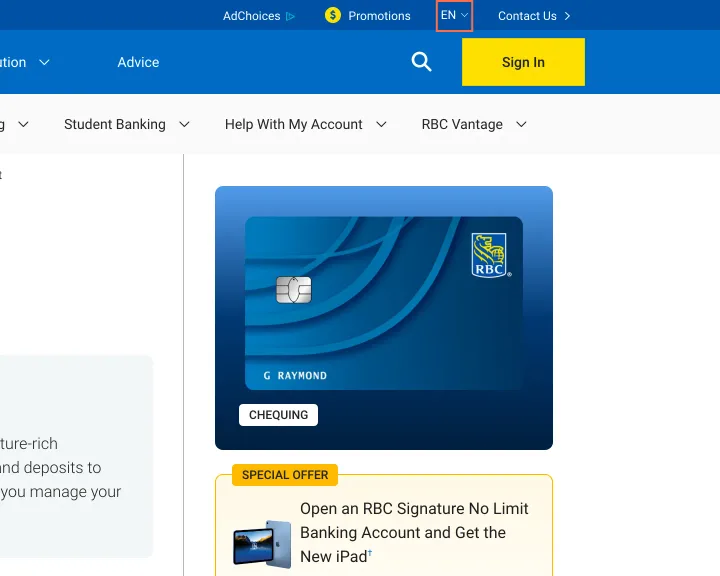
The language and search controls in the header have names that differ from their labels
Observation
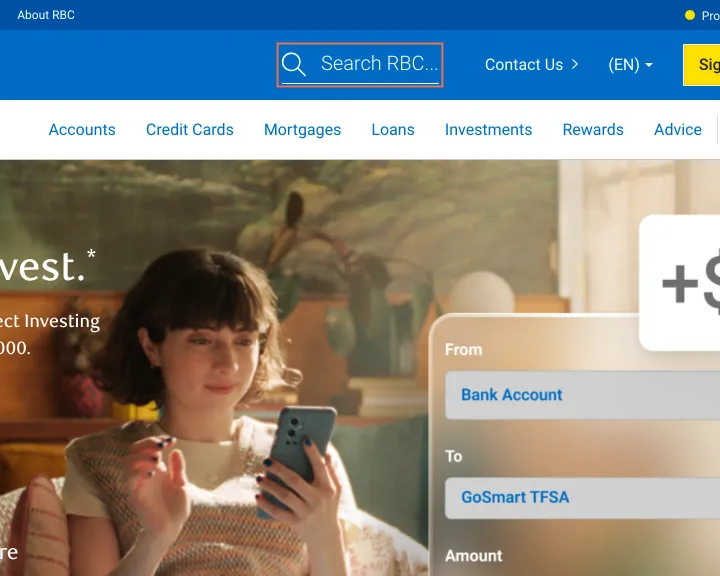
On 41 of the 49 pages axe reports label-content-name-mismatch. The language control shows 'EN' and is named 'Select language' on 34 pages, and the search control shows 'Search RBC...' and is named 'Open search dialog'. On the French phone header 'CONNEXION' is named 'Ouvrir une session sur R B C Banque en direct'.
Implication
A voice-control user who says 'Search RBC' or 'Connexion' gets no response from the control in front of them, on every page with this header.
Recommendation
Start each aria-label with the visible words, such as 'Search RBC, open search dialog' and 'EN, select language', or remove the aria-label where the text is enough.
Measured
- axe label-content-name-mismatch: 1 element (serious)
Finding 2Low
The main menu changes between the home page and Bank Accounts
Observation
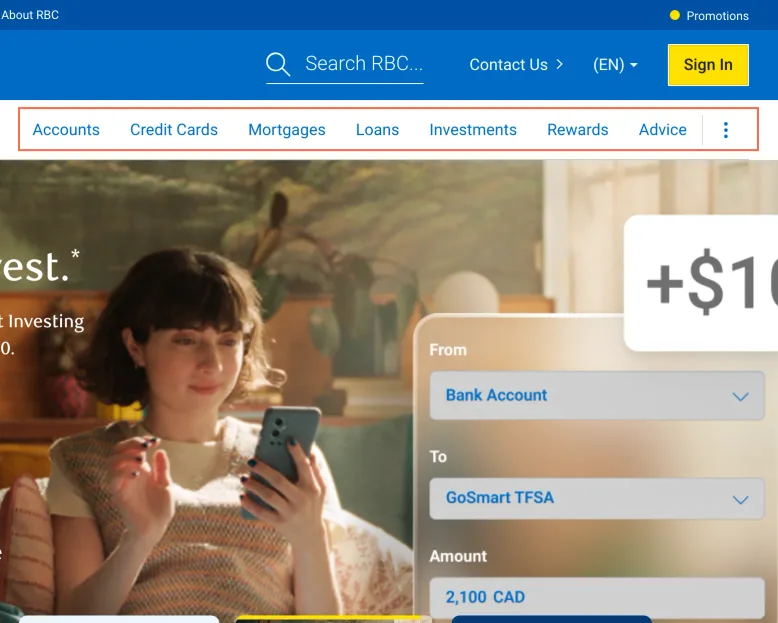
The home page's menu reads Accounts, Credit Cards, Mortgages, Loans, Investments, Rewards and Advice. One click on, Bank Accounts shows Product, Solution and Advice. The second menu shows on 12 of the 49 pages, and Mortgages, Loans and Investments keep the first.
Implication
A person moving from Bank Accounts to Mortgages sees Product and Solution disappear and has to find their way again. It costs time on the first few pages.
Recommendation
Choose one menu and use it on every personal banking page. If the Product and Solution menu is the new one, finish moving Mortgages, Loans and Investments to it.
Measured
- Home menu: Accounts, Credit Cards, Mortgages and 4 more
- Bank Accounts menu: Product, Solution, Advice
Finding 3Medium
The RBC home page names 3 article cards 'object Object'
Observation
The 3 article cards near the foot of the home page, 'Spotting Scams', 'Banking on the Farm' and 'Fake Websites and Ads', each have the aria-label 'object Object', in square brackets. It replaces the visible title, so all 3 links have the same name. axe reports label-content-name-mismatch on them.
Implication
A screen reader user hears 'object Object' 3 times and can't tell the scam advice from the farm story. A voice-control user who says the card's title doesn't reach it.
Recommendation
Remove the aria-label so the card's title is the name. The value is a JavaScript object written into the attribute, so fix the template that sets it, then check the French home page's cards too.
Measured
- Home: 3 article cards named 'object Object'
- axe label-content-name-mismatch: 5 elements (serious)
Finding 4Low
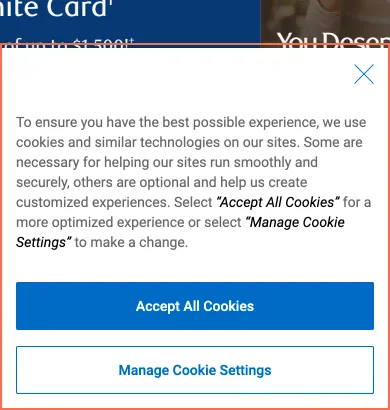
The phone cookie notice takes 362 of 844 px, and its × is labelled as accepting cookies
Observation
At 390 × 844 the notice covers the lower 43% of the home page. Its × is named 'Close - By closing this dialog, you have accepted all cookies', and that wording isn't on screen. In Manage Cookie Settings, Performance, Personalization and Advertising are on before any choice.
Implication
A person who presses × to get rid of the notice is told only in a hidden label that they've accepted all cookies. One press clears the notice, so no task is blocked.
Recommendation
Show the wording of the × on screen, or make × keep only essential cookies. Add a button beside 'Accept All Cookies' that turns the optional ones off, and shorten the phone notice to 3 lines.
Measured
- Cookie notice: 362 px of the 844 px screen
- × named 'By closing this dialog, you have accepted all cookies'
- Performance, Personalization and Advertising on by default
Finding 5Best practice
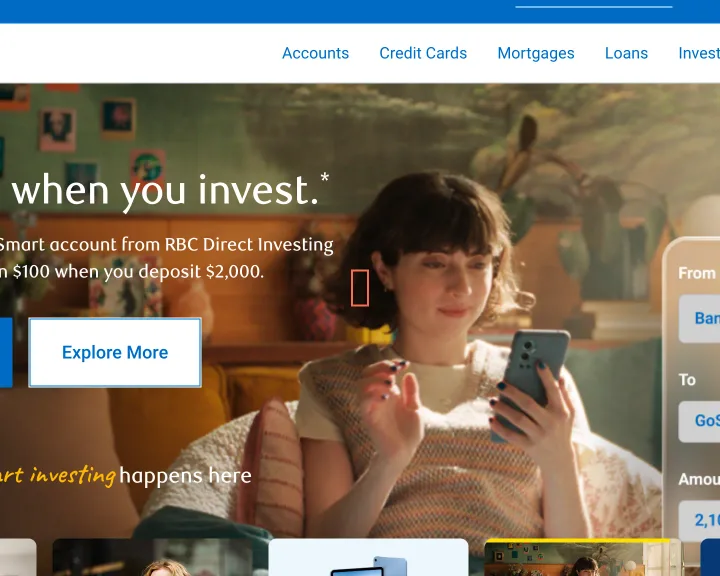
A footnote number in the home hero opens a new tab with no warning
Observation
The footnote '1' on the Avion slide of the home hero has target='_blank' and goes to the card page's legal notes in a new tab, with no sign of it. Footnote '3' on the same slides stays on the page.
Implication
A person checking a condition ends up in a new tab, and the Back button doesn't return them to the home page.
Recommendation
Open the note in the same tab, as footnote '3' does, or mark the link as opening a new tab.
Measured
- 1: opens a new tab, no cue
Finding 6Medium
The scrolling panel on the chequing page can't be reached by keyboard
Observation
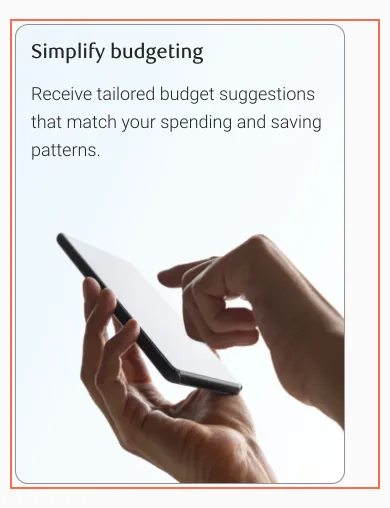
At 820 and 390 px the panel that starts 'Simplify budgeting' holds 1054 px of content in a 360 px box at 390 px. It scrolls sideways and has no focusable element, so axe reports scrollable-region-focusable (serious) at both sizes.
Implication
A person using a keyboard or switch control on a tablet or phone can't scroll the panel, so the benefits past the first card stay out of reach.
Recommendation
Add tabindex='0', role='region' and an aria-label to the panel, or stack the cards at these widths so nothing needs scrolling.
Measured
- axe scrollable-region-focusable: 1 element (serious)
- 1054 px panel in a 360 px box, nothing focusable
Finding 7Medium
The 'Interest Rates' link on the eSavings page is marked by colour alone
Observation
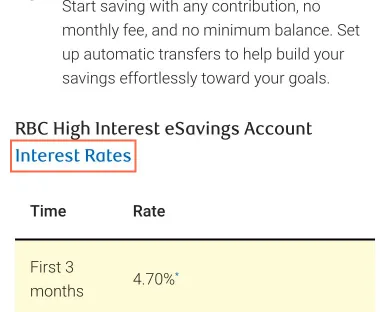
At 390 px the heading 'RBC High Interest eSavings Account Interest Rates' has 'Interest Rates' as a link with no underline, 2.81:1 against the words around it. axe reports link-in-text-block on this page and on the French version of it.
Implication
A person who can't tell the blue from the dark grey sees a heading, and doesn't find the link to the account's rates.
Recommendation
Underline the link, or move it out of the heading into a line of its own, such as 'See all personal account rates'.
Measured
- axe link-in-text-block: 1 element (serious)
- 'Interest Rates' link: 2.81:1 against its text, no underline
Finding 8Medium
Footnote links on Compare Chequing Accounts are 4.3 px wide and named 'legal bug'
Observation
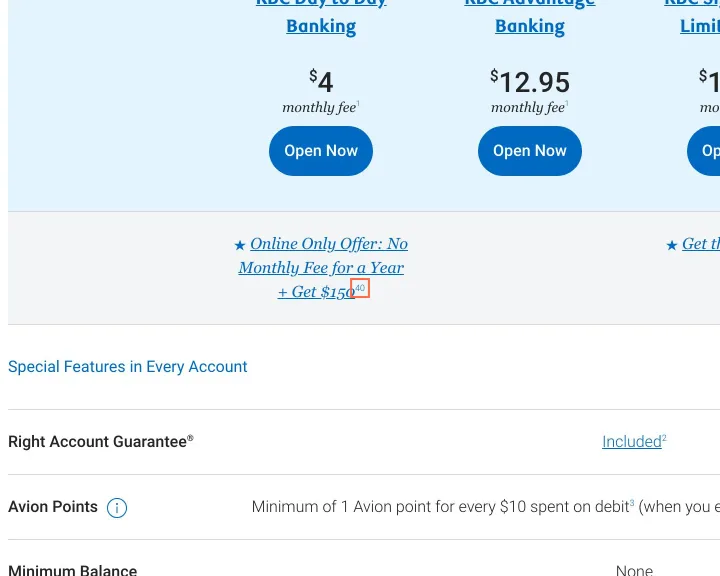
The footnote links in the comparison table measure as little as 4.3 × 9 px and are named 'legal bug 1', 'legal bug 40' and 'legal bug †'. axe reports target-size at 1440 px on the 4 that have no 24 px of clear space around them. On a phone 4 of the home page's 5 hero slide dots are 8 × 8 px, 8 px apart.
Implication
The fee and eligibility conditions are behind these links, and a person with limited dexterity can easily miss a 4 px target. A screen reader announces an internal word, 'bug', where the note's number should be.
Recommendation
Pad each footnote link to at least 24 × 24 px of target, and change the hidden text to 'Note 1'. Give the hero dots the same 24 px target; the visible dot can stay 8 px.
Measured
- axe target-size: 4 elements (serious)
- Footnote links named 'legal bug 1', 4.3 × 9 px
Finding 9Medium
Award badges and product images on the Credit Cards and chequing pages have no alt text
Observation
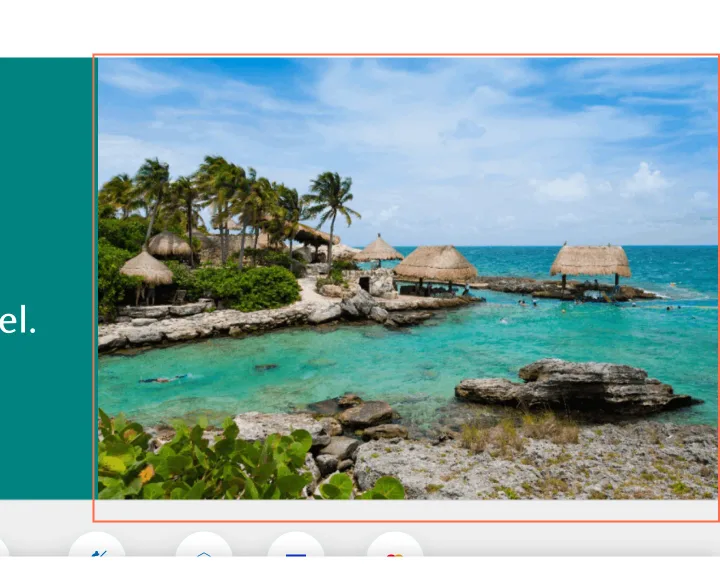
axe reports image-alt on 7 images on Credit Cards at 1440 px, 5 on the chequing page, 5 on Mortgages and 1 on Loans. The names of the 3 awards on Credit Cards appear only in the images. On Travel Credit Cards the banner is role='img' with an empty aria-label.
Implication
A screen reader user misses the 3 awards altogether, because the images are the only place they're stated. On the other pages the file name may be read out in place of the picture.
Recommendation
Give the award images alt text naming the award and the year. Set alt='' on the icons beside a heading, including icon-good and icon-bad, and name the Travel Credit Cards banner or remove its role.
Measured
- Credit Cards: 3 award images with no alt
- axe image-alt: 7 elements (critical)
- axe image-alt: 5 elements (critical)
- axe role-img-alt: 1 element (serious)
Finding 10Medium
Accordion buttons on the Avion card and fees pages have footnote links inside them
Observation
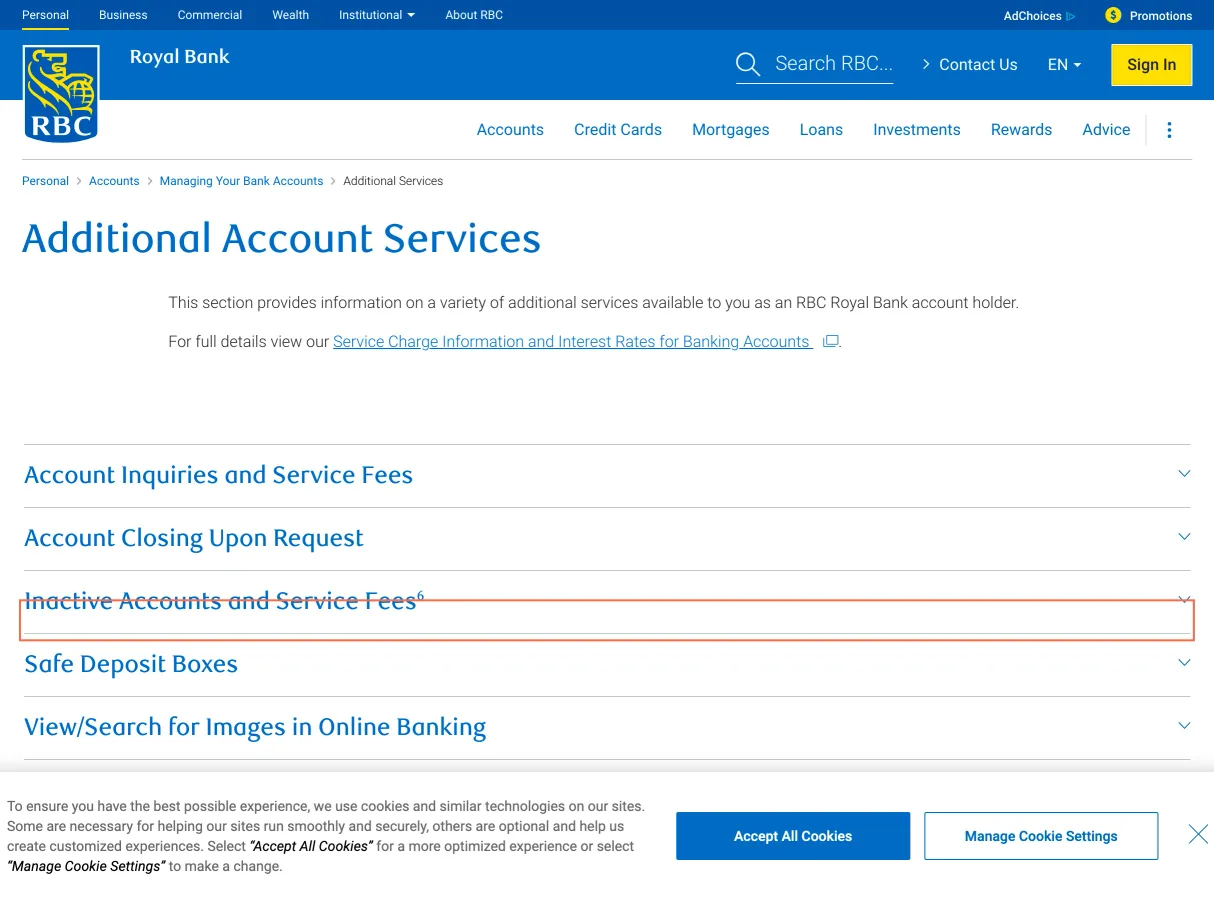
On the RBC Avion Visa Infinite page the 'Even More Ways to Redeem' button holds footnote link 25. On Additional Account Services the 'Inactive Accounts and Service Fees' button holds footnote link 6, and Tab stops on it. axe reports nested-interactive on both pages and on Travel Credit Cards at 390 px.
Implication
A link inside a button isn't exposed to a screen reader as a link, so the footnote on the inactive-account fee can be focused but isn't announced for what it is.
Recommendation
Move the footnote link out of the button, into the panel's text or beside the button. The heading can keep its number as plain text.
Measured
- axe nested-interactive: 1 element (serious)
Finding 11Medium
Avion card footnotes and the Investments hero line fail contrast
Observation
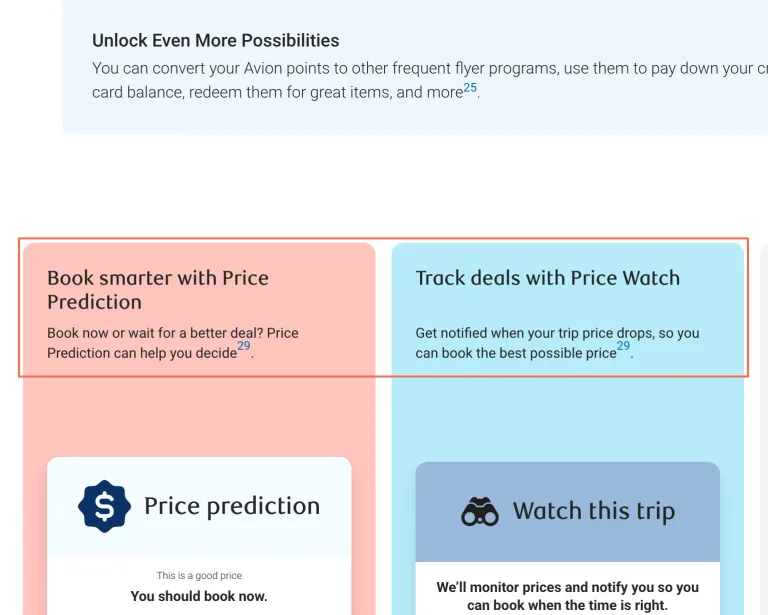
On the RBC Avion Visa Infinite page footnote 29 is #006ac3 at 12 px on #ffc4bb, 3.6:1, and on #b6ebf9, 4.21:1. At 390 px 'of tomorrow' in the Investments hero line is #0091da on #efebe1, 2.9:1, at 21 px. axe reports color-contrast on each.
Implication
A person with low vision can miss the footnote that qualifies Price Prediction and Price Watch. On a phone the same person reads 'Your idea' and loses the rest of the line.
Recommendation
Darken footnote 29 on the 2 tinted cards to reach 4.5:1. Darken the blue of 'of tomorrow' too, or set the line on a darker background.
Measured
- Footnote 29: 3.6:1 and 4.21:1 at 12 px
- axe color-contrast: 2 elements (serious)
- axe color-contrast: 1 element (serious)
Finding 12Medium
The 3 'Add a New Credit Card to Compare' buttons on Compare Credit Cards have no name
Observation
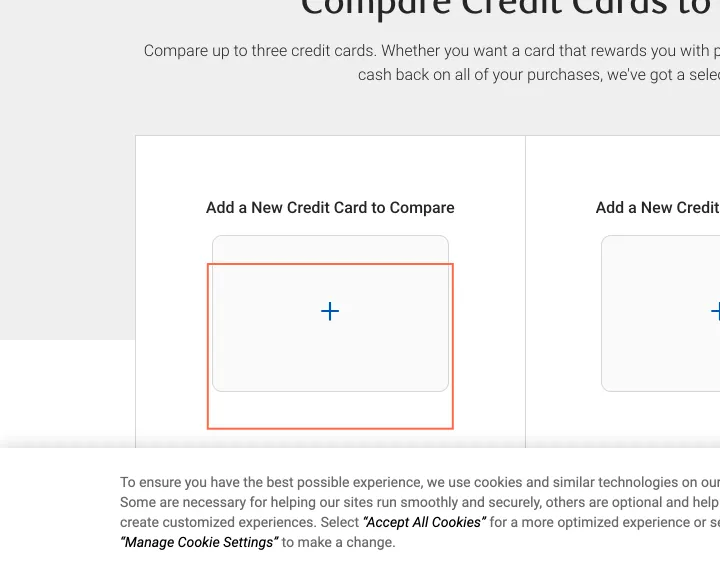
Each of the 3 + buttons is an empty link with no aria-label or title, 237 × 157 px at 1440 px. axe reports link-name on all 3, and a fourth element at 390 px, where the card-switcher arrows have no name either. Enter does open the card picker and moves focus into it.
Implication
A screen reader user reaches 3 unnamed links and has no way to know they start the comparison. The page's one task depends on them.
Recommendation
Add aria-label 'Add a card to compare, slot 1' and so on, and name the arrows 'Previous card' and 'Next card'. The visible heading above each + can supply the name through aria-labelledby.
Measured
- axe link-name: 3 elements (serious)
- axe link-name: 4 elements (serious)
Finding 13Medium
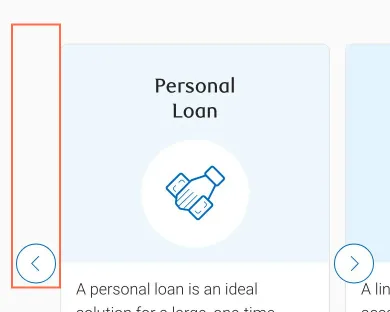
The Loans carousel's previous and next buttons have no name on a phone
Observation
At 390 px on Loans and Lines of Credit the carousel's 2 buttons hold an arrow image with no alt, so axe reports button-name (critical). On the RBC Mobile app page the select that switches between Personal, Business, RBC Direct Investing and Wealth Management also has no name, and axe reports select-name.
Implication
A screen reader user hears 'button' twice and can't tell these move through the loan options. On the app page the select gives no hint of what it changes.
Recommendation
Set alt='Previous' and alt='Next' on the arrow images, and add a label to the select, for example 'Show the app for'.
Measured
- axe button-name: 2 elements (critical)
- Loans, 390 px: 2 carousel buttons with no name
- axe select-name: 1 element (critical)
Finding 14Low
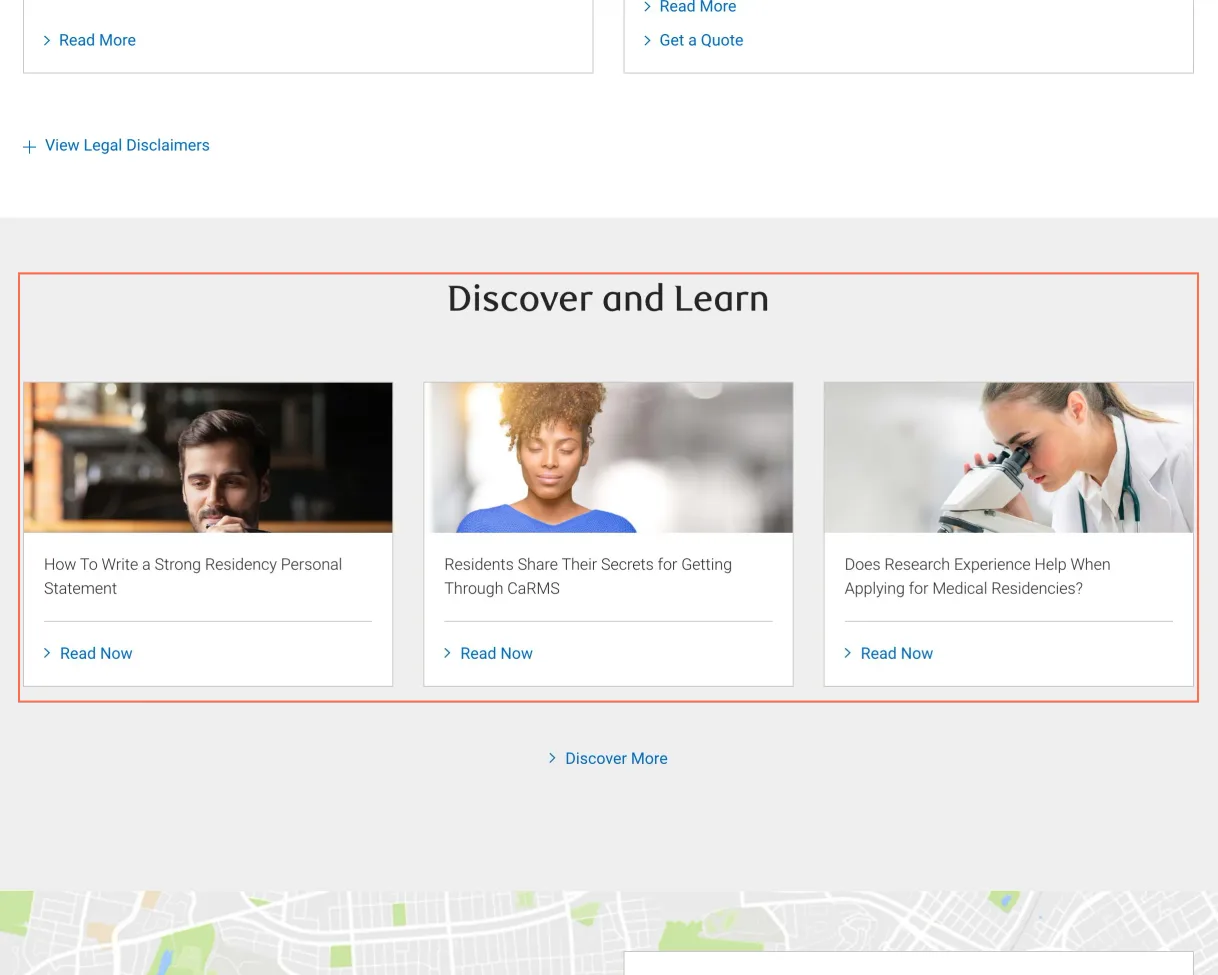
The Insurance page's 'Discover and Learn' block lists articles for medical residents
Observation
Under 'Discover and Learn' the Insurance page, written for RBC clients, lists 3 articles from discover.rbcroyalbank.com, on residency personal statements, CaRMS and research experience. None of them mentions insurance in its title.
Implication
A person looking for coverage advice gets nothing useful from this block, and it reads as a mistake on a page about protecting a family.
Recommendation
Replace the 3 links with insurance articles, or remove the block until the feed filters by topic.
Measured
- Insurance page lists 3 articles on medical residency
Finding 15Low
Book an Appointment still cites physical distancing and capacity guidelines
Observation
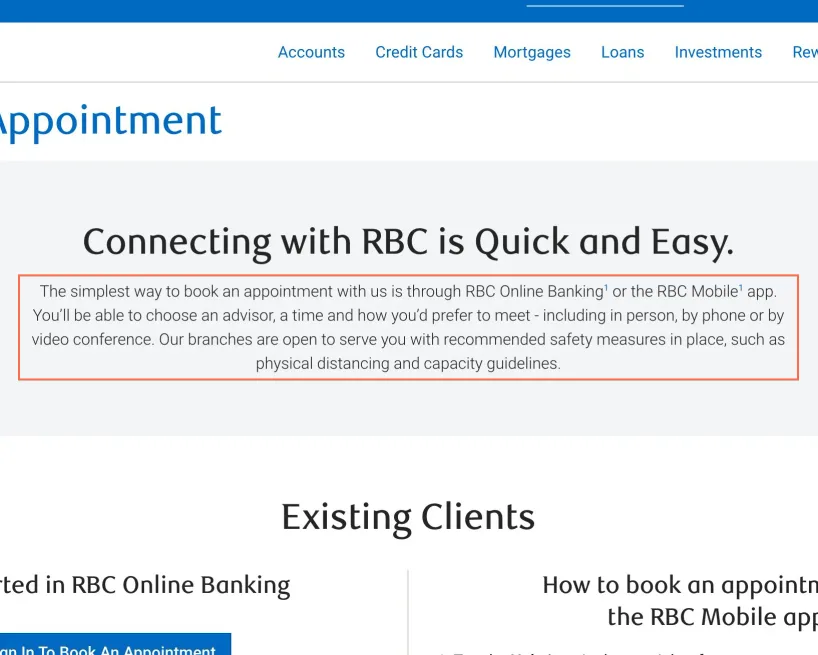
The introduction reads 'Our branches are open to serve you with recommended safety measures in place, such as physical distancing and capacity guidelines.' No other page examined mentions it.
Implication
A person booking a branch visit may wonder whether limits still apply, and whether they can bring someone with them.
Recommendation
Remove the sentence, or replace it with what's true of a branch visit today.
Measured
- Appointment page still cites 'physical distancing'
Finding 16Medium
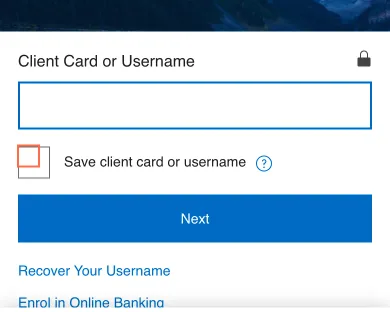
The phone sign-in has an unnamed checkbox and a help button called 'The svg icon help'
Observation
At 390 px the 'Save client card or username' checkbox has an empty label, and its text is in a separate table cell, so axe reports label (critical). At 1440 px the same label holds the text. The help button beside it is named 'The svg icon help'.
Implication
A screen reader user on a phone hears 'checkbox' with no purpose, on a page where saving a client card on a shared device is a real risk. The help button tells them nothing either.
Recommendation
Put 'Save client card or username' inside the label at every width, as the desktop layout does. Name the help button 'About saving your client card or username', and drop the layout table.
Measured
- axe label: 1 element (critical)
- Sign-in, 390 px: help button named 'The svg icon help'
Finding 17Low
Switching to French on search results drops the search
Observation
On results for 'tfsa', Canada - FR opens /fr/search-public/index.html with no query and no results. From the other 9 English pages tested, including card, rates and calculator pages, the same control opens the French equivalent.
Implication
A person who switches language to read results in French has to type the search again.
Recommendation
Carry the question parameter into the French address, so the same search runs in French.
Measured
- Canada - FR on results drops the search query
Finding 18Low
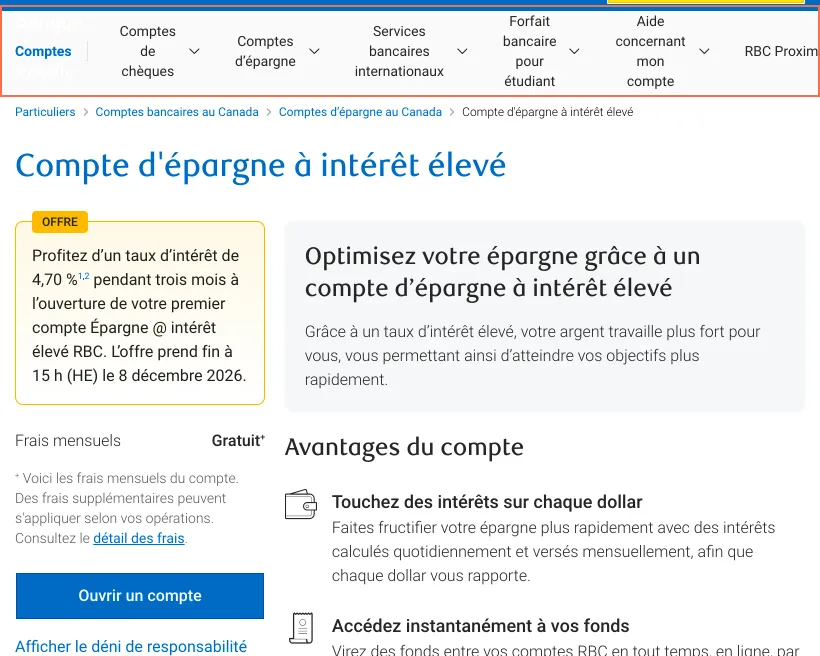
The French savings page is 57 px too wide at tablet width, and its last menu item is cut
Observation
At 820 px the French sub-navigation wraps labels such as 'Aide concernant mon compte' to 4 lines and reaches 877 px, so the page scrolls sideways and 'RBC Proximité' is cut at the right edge. The English savings page measures 820 px.
Implication
French-reading customers on a tablet get a page that slides sideways and a menu item they have to scroll to, and English-reading ones don't.
Recommendation
Switch the French sub-navigation to its collapsed menu at a wider breakpoint, or shorten the labels so the row fits within 820 px.
Measured
- French nav: 877 px wide at 820 px, last item cut
- Page 877 px wide in a 820 px viewport
Finding 19Low
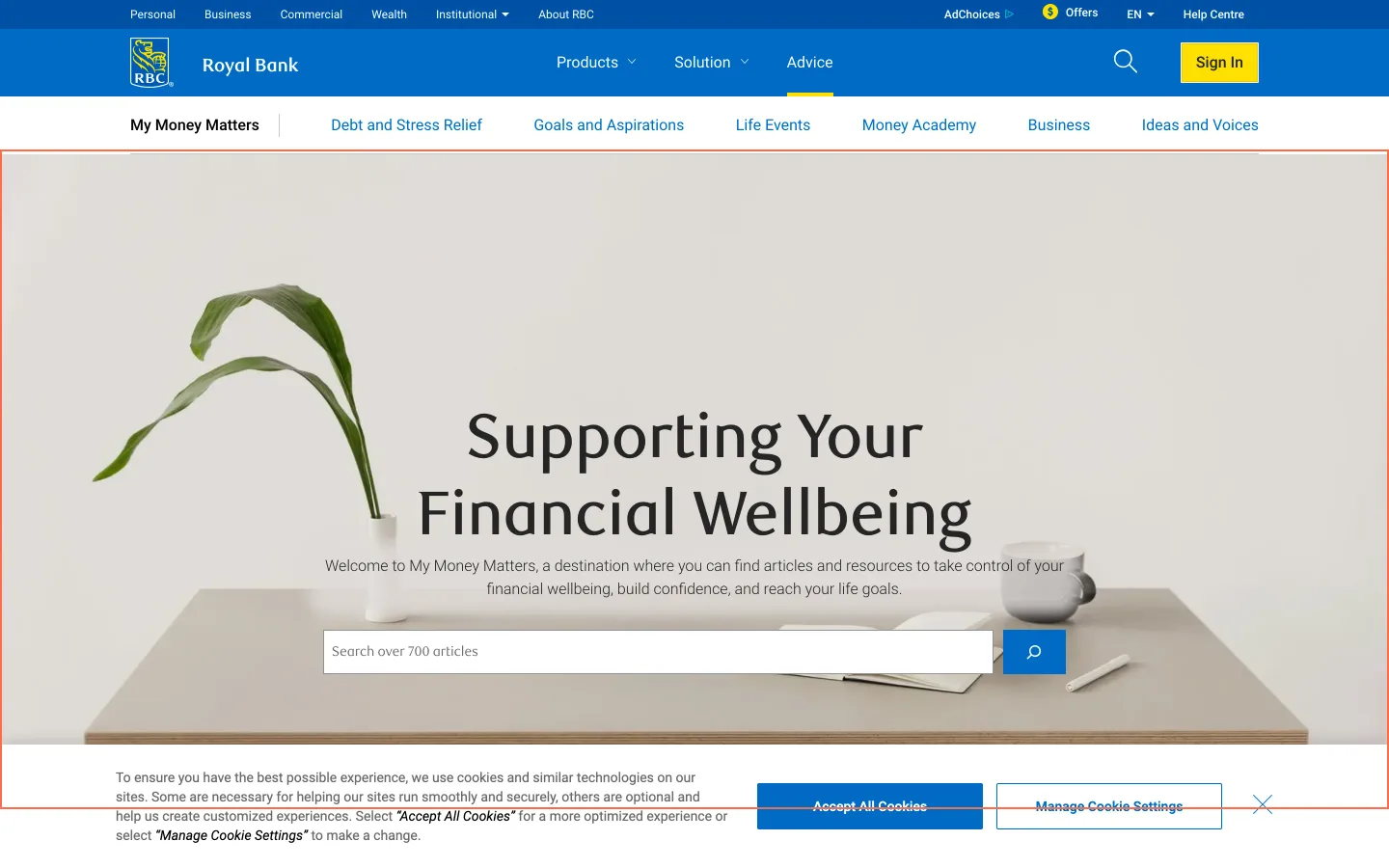
The My Money Matters search field is inside an element marked as an image
Observation
The hero with 'Search over 700 articles' is a div with role='img' and the label 'My Money Matters - RBC', and the search field and button are inside it. axe reports nested-interactive at all 3 sizes, and link-name on 3 other links.
Implication
A screen reader can treat the whole hero as one picture, so a person using one may never learn there's a search on this page.
Recommendation
Remove role='img' from the hero and put the label on the background through a separate element, leaving the form as ordinary content.
Measured
- axe nested-interactive: 1 element (serious)
- axe link-name: 3 elements (serious)
What was examined
- Home
- Bank accounts
- Chequing: RBC Signature No Limit Banking
- Savings: RBC High Interest eSavings
- Compare chequing accounts
- Chequing account selector
- Credit cards
- Travel credit cards
- Credit card: RBC Avion Visa Infinite
- Compare credit cards
- Cash back calculator
- Mortgages
- Mortgage rates
- Mortgage payment calculator
- Loans and lines of credit
- Personal loans
- Car loan payment calculator
- Investments
- TFSA
- Rates: GICs
- Insurance
- Account services and fees
- Foreign exchange
- Apply online
- Book an appointment
- Sign in to Online Banking
- Customer service
- Branch, ATM and phone
- Search results
- Branch and ATM locator
- Accessibility
- Mobile app
- Tutorial: pay bills online
- French home page
- French product: Compte d'épargne à intérêt élevé
- Branch location: Wellington & Simcoe
- Apply: credit card application, first step
- Apply: mortgage pre-approval, first step
- Mortgage: fixed rate
- Insurance product: home insurance
- RBC Rates
- RRSP calculator
- Mortgage affordability calculator
- Mortgage specialist locator
- Business banking
- Newcomers: RBC Newcomer Advantage
- My Money Matters
- Article: fake websites and ads
- Privacy and security
I didn’t observe real users. I examined only public pages, signed out, on the date shown and at the sizes listed. A browser took the measurements, and each finding gives its numbers.
Automated checks
| Accessibility rules failed (axe) | 15 rules: 5 critical, 10 serious |
|---|---|
| Tap targets under 24 pixels | 178 |
| Links that open a new tab | 114 |
| Console errors on load | 175 |
The 15 rules, by impact, with the elements and pages each failed on
image-altcriticalWCAG 1.1.1 Non-text Content (A) · 22 elements on 5 pages: Chequing: RBC Signature No Limit Banking; Credit cards; Mortgages; Loans and lines of credit; Car loan payment calculator
button-namecriticalWCAG 4.1.2 Name, Role, Value (A) · 2 elements on 1 page: Loans and lines of credit
labelcriticalWCAG 4.1.2 Name, Role, Value (A) · 2 elements on 2 pages: Chequing account selector; Sign in to Online Banking
aria-allowed-attrcriticalWCAG 4.1.2 Name, Role, Value (A) · 1 element on 1 page: Mortgage: fixed rate
select-namecriticalWCAG 4.1.2 Name, Role, Value (A) · 1 element on 1 page: Mobile app
label-content-name-mismatchseriousWCAG 2.5.3 Label in Name (A) · 58 elements on 41 pages: Home; Bank accounts; Chequing: RBC Signature No Limit Banking; Savings: RBC High Interest eSavings; Compare chequing accounts; Credit cards; Travel credit cards; Credit card: RBC Avion Visa Infinite; Compare credit cards; Cash back calculator; Mortgages; Mortgage rates; Loans and lines of credit; Personal loans; Car loan payment calculator; Investments; TFSA; Rates: GICs; Insurance; Account services and fees; Foreign exchange; Apply online; Book an appointment; Customer service; Branch, ATM and phone; Search results; Branch and ATM locator; Accessibility; Mobile app; Tutorial: pay bills online; French home page; French product: Compte d'épargne à intérêt élevé; Branch location: Wellington & Simcoe; Mortgage: fixed rate; Insurance product: home insurance; RBC Rates; RRSP calculator; Mortgage specialist locator; Business banking; Newcomers: RBC Newcomer Advantage; Privacy and security
target-sizeseriousWCAG 2.5.8 Target Size (Minimum) (AA) · 18 elements on 7 pages: Home; Bank accounts; Compare chequing accounts; Travel credit cards; French home page; French product: Compte d'épargne à intérêt élevé; Mortgage: fixed rate
color-contrastseriousWCAG 1.4.3 Contrast (Minimum) (AA) · 16 elements on 6 pages: Bank accounts; Credit card: RBC Avion Visa Infinite; Investments; RBC Rates; RRSP calculator; My Money Matters
link-nameseriousWCAG 2.4.4 Link Purpose (In Context) (A); WCAG 4.1.2 Name, Role, Value (A) · 7 elements on 2 pages: Compare credit cards; My Money Matters
nested-interactiveseriousWCAG 4.1.2 Name, Role, Value (A) · 4 elements on 4 pages: Travel credit cards; Credit card: RBC Avion Visa Infinite; Account services and fees; My Money Matters
link-in-text-blockseriousWCAG 1.4.1 Use of Color (A) · 3 elements on 3 pages: Savings: RBC High Interest eSavings; French product: Compte d'épargne à intérêt élevé; Branch location: Wellington & Simcoe
role-img-altseriousWCAG 1.1.1 Non-text Content (A) · 3 elements on 2 pages: Travel credit cards; My Money Matters
aria-prohibited-attrseriousWCAG 4.1.2 Name, Role, Value (A) · 1 element on 1 page: Mortgage: fixed rate
autocomplete-validseriousWCAG 1.3.5 Identify Input Purpose (AA) · 1 element on 1 page: Mortgage payment calculator
scrollable-region-focusableseriousWCAG 2.1.1 Keyboard (A); WCAG 2.1.3 Keyboard (No Exception) (AAA) · 1 element on 1 page: Chequing: RBC Signature No Limit Banking
The engine counted these on every page I examined, at all three sizes.