UX heuristic analysis · Technology
Google.com: a UX heuristic analysis
For Google’s digital product team
- Assessed
- Published
- Examined
- 10 pages of google.com at desktop (1440 px), tablet (820 px) and phone (390 px)
- Method
- 10 pages, read by the 4th Culture engine at three sizes (1440 × 900, 820 × 1180, 390 × 844) on 19 October 2026; reviewed from Toronto, Canada
Summary
Google’s settings, privacy and advanced search pages fail where the search page does not
The faults are on the pages behind the search box: the two pages where a signed-out visitor controls how Google uses their searches block pinch zoom, call one setting by two names, and open their cards into one shared browser window. At 400% zoom the desktop home page hides ‘Sign in’, and the touch layout’s first Tab stops show no focus. Advanced Search reports no open state on its comboboxes, and the Chrome page hides a visible link bar from screen readers while it still takes focus. The home page itself is one box and a few entry points, and its phone layout reflows.
Where to start
- Finding 8: The two pages that control your search data block pinch zoom Medium
- Finding 9: One data setting has two names, and its card opens a shared browser window Medium
- Finding 3: Zoomed to 400%, the desktop home page scrolls sideways and hides ‘Sign in’ Medium
- Finding 2: On tablets and phones, the first Tab stops on the home page show no focus Medium
- Finding 1: Links inside sentences are told apart by colour alone on the home and switch pages Medium
| High | Medium | Low | Best practice |
|---|---|---|---|
| 0 | 9 | 2 | 0 |
The 11 findings
Findings about the whole site first, then each page in the order examined, the most severe first within each. The levels, high, medium, low, best practice, are explained on the method page.
Finding 1Medium
Links inside sentences are told apart by colour alone on the home and switch pages
Observation
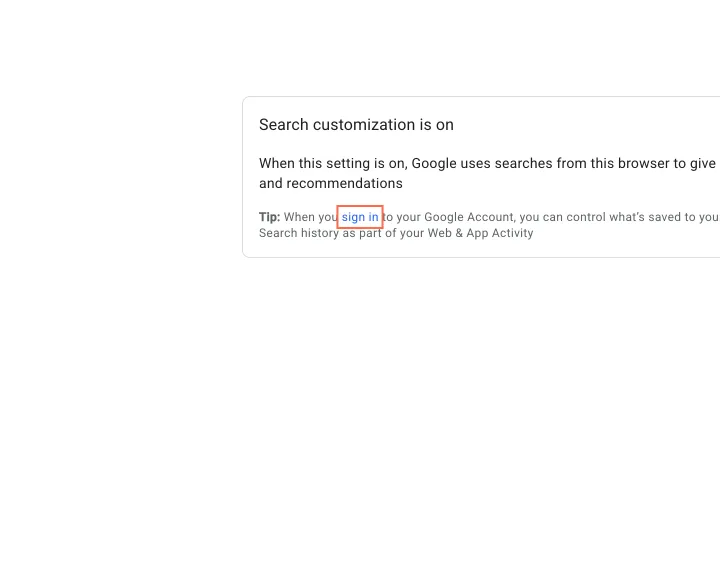
On ‘Search customization is on’, ‘sign in’ in the 12 px tip line is blue against grey text at 1.23:1, with no underline and the same weight. On the home page ‘Français’ in ‘Google offered in: Français’ is 1.22:1 against its line in the light theme and 1.18:1 in the dark theme (26 October), and is underlined only on hover.
Implication
People with low vision or colour blindness read it as plain text and miss the way to manage their history in their account, on the page about that very choice.
Recommendation
Underline links that sit inside a sentence, or give them at least 3:1 against the surrounding text plus an underline on hover and focus.
Measured
- Links not set apart from text: 1, contrast 1.2:1
- axe link-in-text-block: 2 elements (serious)
Finding 2Medium
On tablets and phones, the first Tab stops on the home page show no focus
Observation
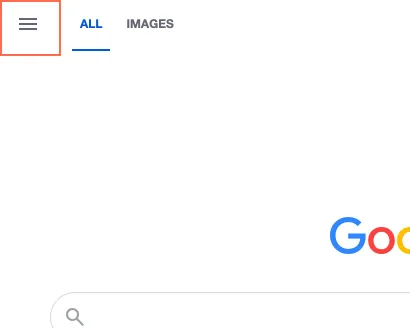
In the touch layout, pressing Tab moves focus to ‘Main menu’, then on to the ‘Google Search’ magnifier in the search box. Neither shows any change when focused: no outline, ring or background. Other stops on the same page, such as ‘Images’ and ‘Google apps’, do show a ring.
Implication
Tablet users with a keyboard case, and switch-access users on phones, cannot see where they are at the very first step. They press Tab and nothing appears to happen.
Recommendation
Give ‘Main menu’ and the magnifier button the same focus ring the other header controls already have. Check every control in the touch layout with real Tab presses, not only the desktop layout.
Measured
- Tab to 'Main menu' and 'Google Search': no visible focus
- Tab stop 6, Google Search: no focus indicator
Finding 3Medium
Zoomed to 400%, the desktop home page scrolls sideways and hides ‘Sign in’
Observation
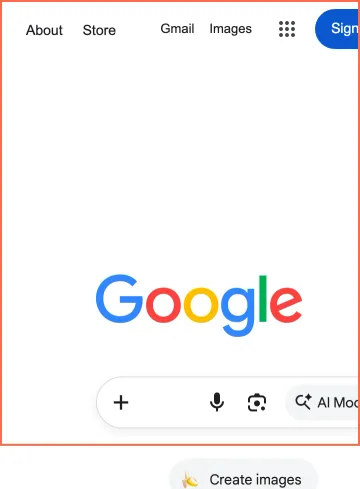
In a desktop browser window 360 px wide, which is what a 1440 px screen gives at 400% zoom, the home page stays 400 px wide. ‘Sign in’ and the ‘AI Mode’ button sit past the right edge, and the page scrolls in both directions. The phone layout at the same width reflows correctly.
Implication
People with low vision who zoom a desktop browser get a home page that scrolls two ways, with the account button and the AI entry out of sight. The fix exists already in the phone layout.
Recommendation
Let the desktop layout’s outer container shrink below 400 px and wrap the header links, or hand narrow desktop windows the phone layout. Test at 320 px wide, which is 1280 px at 400%.
Measured
- 360 px desktop window: page 400 px wide, 'Sign in' cut off
Finding 4Low
On phones the AI entry is an unlabelled sparkle icon with a different name
Observation
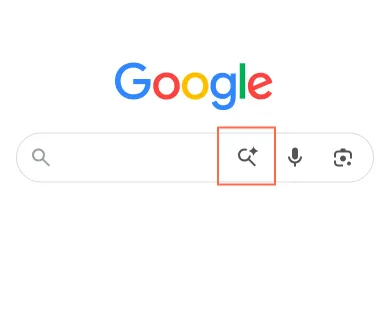
The desktop search box has a text pill, ‘AI Mode’. On a phone the same entry is a sparkle-and-magnifier icon with no words, beside icons for voice and camera, and screen readers hear it as ‘Search with A.I.’.
Implication
Three icons in a row make people guess. The feature also has two names, so a person who has heard of ‘AI Mode’, or a voice-control user who says it, may not find it on the phone.
Recommendation
Use one name, ‘AI Mode’, for the visible label and the accessible name. Show the words beside the icon on phones where there is room, or add a first-use hint.
Measured
- Sparkle icon named 'Search with A.I.'; desktop says 'AI Mode'
Finding 5Medium
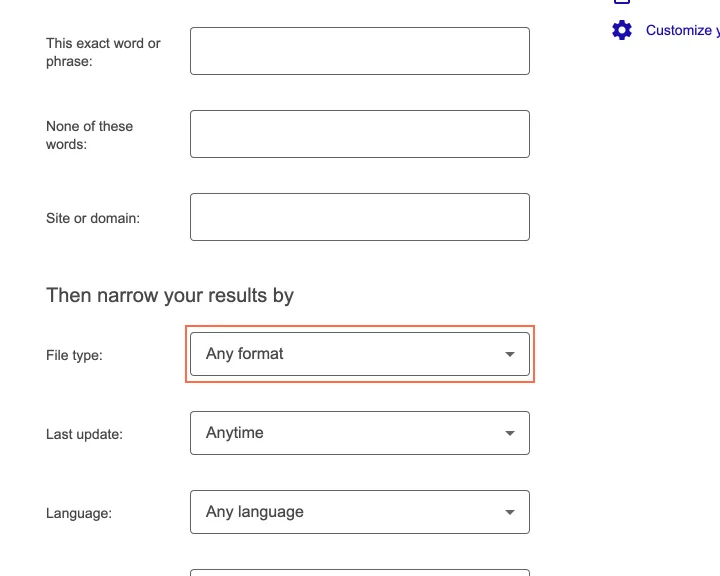
The drop-downs on both Advanced Search pages do not say whether they are open
Observation
Advanced Search has five drop-downs and Advanced Image Search seven, from ‘Any format’ to ‘Not filtered by license’, each a combobox (axe aria-required-attr). On load none of the five has aria-expanded; it appears after the first click.
Implication
A screen reader user hears a combobox but not whether it is collapsed, so they cannot tell if their key press opened the list. It is a small gap on the page built for people who want precise control.
Recommendation
Set aria-expanded="false" on each combobox when the page loads and keep it in step as it opens and closes. One shared component fixes both pages.
Measured
- axe aria-required-attr: 5 elements (critical)
- axe aria-required-attr: 7 elements (critical)
Finding 6Low
Advanced Search gives no example of what to type in its four boxes
Observation
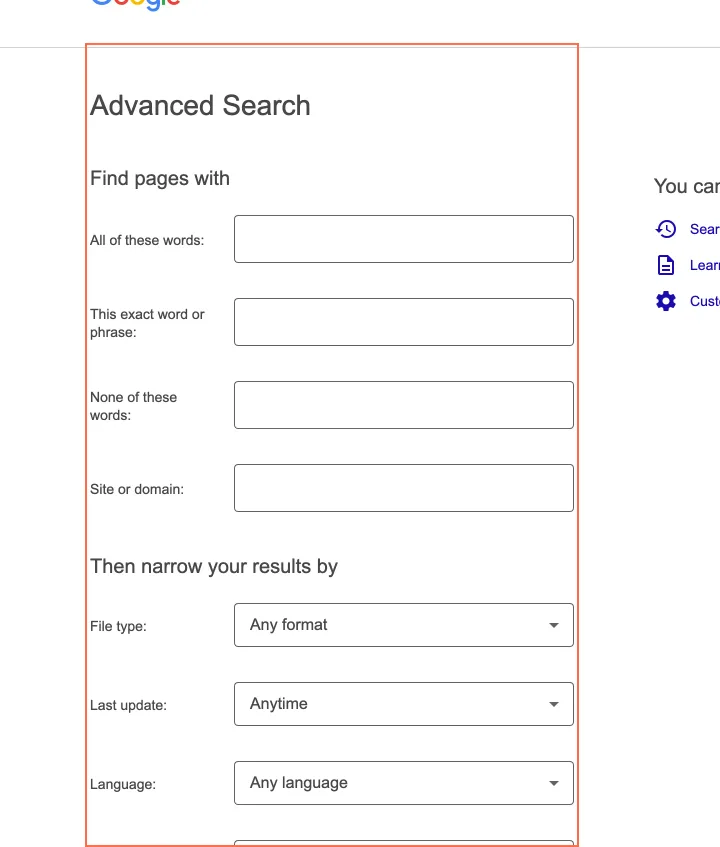
‘All of these words:’, ‘This exact word or phrase:’, ‘None of these words:’ and ‘Site or domain:’ carry a label only, with no placeholder or hint. ‘Learn how to use operators’ is in a side column under ‘You can also’, away from the fields it explains.
Implication
Someone who has not met ‘site:’ searching cannot tell whether ‘Site or domain:’ wants ‘example.com’ or a full address. The page offers the power but not the lesson.
Recommendation
Put one short example under each box, such as ‘Example: example.com’ under ‘Site or domain:’. Show the search the form will run, for instance ‘site:example.com’, beside the button before it is pressed.
Measured
- Advanced Search: four empty text boxes with labels only, no placeholder or hint; 'Learn how to use operators' is apart from them, under 'You can also' in the right column
Finding 7Medium
Button and link names do not contain their visible words
Observation
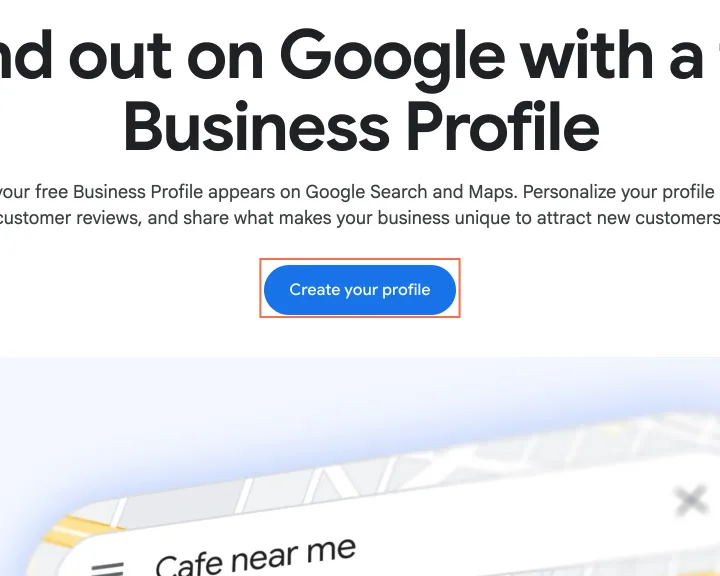
On the Business Profile page (google.com/services now redirects to business.google.com/ca-en), both ‘Create your profile’ links are named ‘Create a Google Business Profile - (opens in new tab)’. On the Chrome page, three links that read ‘Explore Gemini in Chrome’ or ‘Explore AI Mode’ are named only ‘Open in the same tab’.
Implication
A voice-control user who says ‘click Create your profile’ gets no match on the page’s main action. A screen reader user listing links on the Chrome page hears ‘Open in the same tab’ three times, with no destination.
Recommendation
Start each name with the visible words (‘Create your profile, opens in a new tab’), and let the visible text name the links on the Chrome page.
Measured
- axe label-content-name-mismatch: 3 elements (serious)
- 26 Oct: ‘Create your profile’ named ‘Create a Google Business Profile…’
Finding 8Medium
The two pages that control your search data block pinch zoom
Observation
‘Search customization is on’ (/history/optout) and ‘Your data in Search’ set their viewport to ‘maximum-scale=1, user-scalable=no’. These are the pages where a signed-out visitor decides how Google uses their searches. The home page and Search settings allow zoom.
Implication
On Android Chrome a person who needs larger text cannot pinch to enlarge it, on the pages where the wording decides what happens to their data. iOS Safari ignores the tag; Android does not.
Recommendation
Remove ‘maximum-scale=1’ and ‘user-scalable=no’ from both viewport tags, as the home page already does. If a layout breaks when zoomed, fix the layout rather than the zoom.
Measured
- axe meta-viewport: 1 element (moderate)
Finding 9Medium
One data setting has two names, and its card opens a shared browser window
Observation
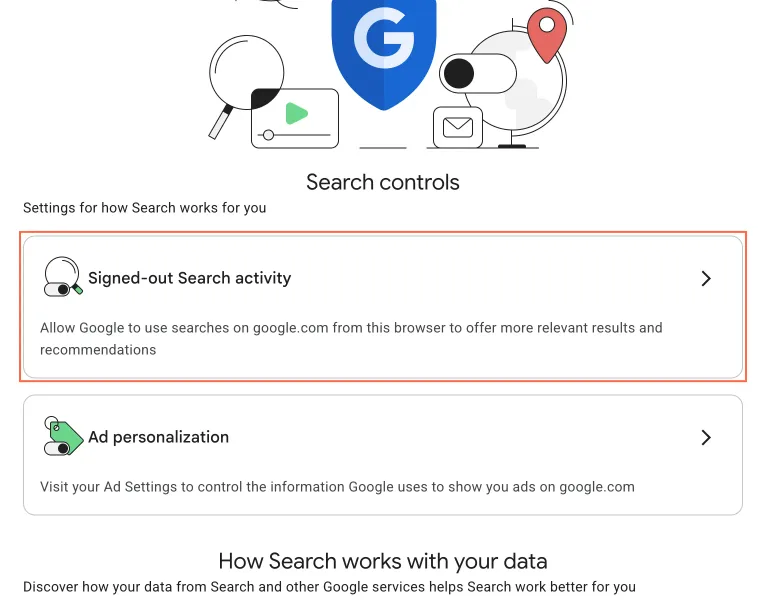
Search settings calls it ‘Search customization’; ‘Your data in Search’ calls the same setting ‘Signed-out Search activity’. That page’s five cards use target="blank_", a typo for _blank, so they share one named window, and two of them do not say they open a new tab. The switch page itself has no link back.
Implication
A person turning personalisation off has to work out that two names mean one control. A second card silently replaces the page the first one opened, so they can lose their place in the one task where trust matters most.
Recommendation
Use one name everywhere. Fix the target to _blank, or open in the same tab, and say which in every card’s name. Give the switch page a link back to where the visitor came from.
Measured
- Five cards use target="blank_"; two say nothing about a new tab
Finding 10Medium
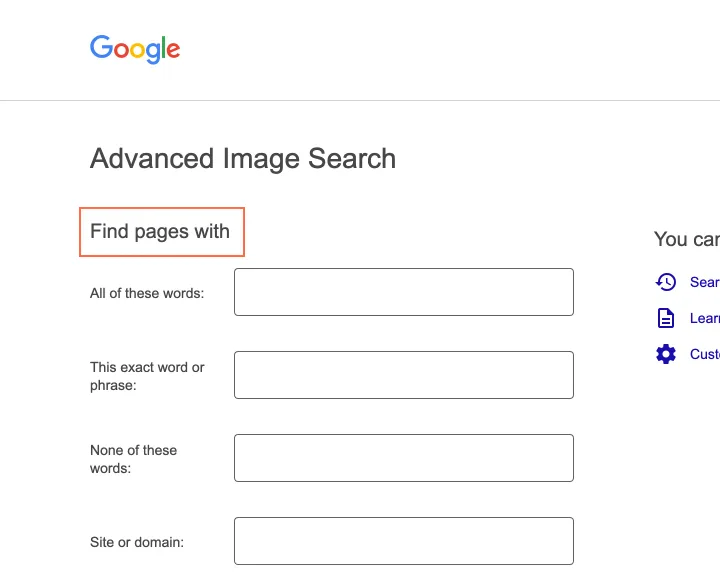
Advanced Image Search reuses the web page’s title, heading and wording
Observation
The page <title> is ‘Google Advanced Search’, the same as the web version, while its h1 reads ‘Advanced Image Search’; its first section heading reads ‘Find pages with’ although it finds images. ‘Usage rights’ defaults to ‘All’ here and to ‘Not filtered by license’ on Advanced Search.
Implication
A visitor cannot tell the two forms apart from the tab title or a screen reader’s heading list. Two wordings for the same ‘no filter’ choice make people stop and check what they picked.
Recommendation
Title the page ‘Advanced Image Search’ and change the heading to ‘Find images with’. Use one wording for the ‘no filter’ choice on both pages.
Measured
- Title 'Google Advanced Search', heading 'Find pages with'
- 26 Oct: title ‘Google Advanced Search’ over h1 ‘Advanced Image Search’
Finding 11Medium
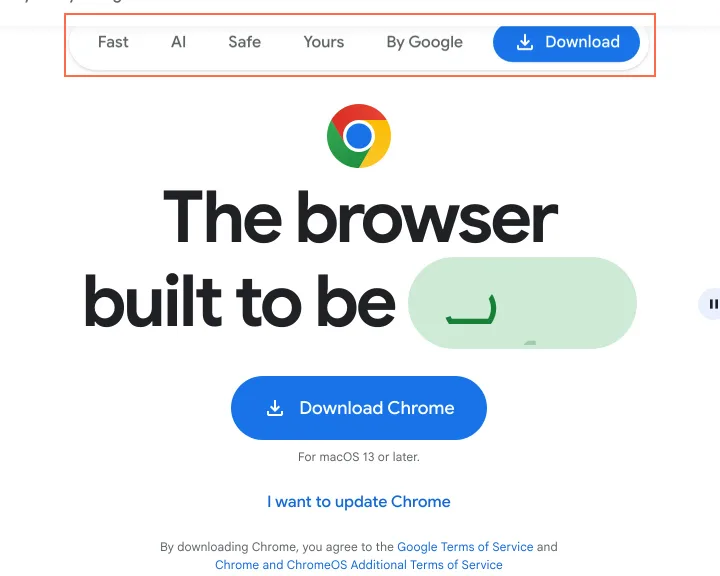
On the Chrome page, visible controls are hidden from screen readers but take focus
Observation
The bar at the top of google.com/chrome (AI, Yours, Safe, Fast, By Google, Download) has aria-hidden="true" while it is shown, and its Download button is still in the Tab order. Five Play buttons are aria-hidden with tabindex 0. The video poster’s attribute is misspelt aria_hidden, so it is an image with no alt text.
Implication
A screen reader user tabbing the page lands on Download and Play and hears nothing for either. The page’s main ‘Download Chrome’ button still works, so the task is not blocked.
Recommendation
Remove aria-hidden from the bar whenever it is visible, and make it inert when it is not. Drop aria-hidden from the Play buttons, which already have names. Fix the aria_hidden typo, or give the poster alt="".
Measured
- axe aria-hidden-focus: 7 elements (serious)
- 26 Oct: visible jump bar aria-hidden, Download tabbable; 5 Play buttons too
- axe image-alt: 1 element (critical)
What was examined
- Search home and 4 more built the same way
- Google Images home
- Advanced Search
- Google Business Profile
- Search settings and 2 more built the same way
- How Search works
- Search customization switch
- Your data in Search
- Advanced Image Search
- Google Chrome
The sitemap lists 5198 more pages the site does not link to; they were listed, not read.
No real users were observed. Only public pages were examined, signed out, on the date shown, at the sizes listed. A browser took the measurements; the numbers are in each finding.
Automated checks
| Accessibility rules failed (axe) | 10 rules: 4 critical, 5 serious, 1 moderate |
|---|---|
| Tap targets under 24 pixels | 13 |
| Links that open a new tab | 40 |
| Console errors on load | 0 |
The 10 rules, by impact, with the elements and pages each failed on
aria-required-attrcriticalWCAG 4.1.2 Name, Role, Value (A) · 16 elements on 4 pages: Search home; Advanced Search; Search settings; Advanced Image Search
aria-required-attr: not counted against the level, because Seen in the engine’s phone capture; not reproducible live without a phone user agent (desktop markup names the listbox and sets aria-expanded correctly). Re-verify on a device before publishing.
aria-allowed-attrcriticalWCAG 4.1.2 Name, Role, Value (A) · 1 element on 1 page: Google Chrome
aria-allowed-attr: not counted against the level, because Inside the cross-origin YouTube embed; the player loaded alone answers Error 153, so not reproducible live.
button-namecriticalWCAG 4.1.2 Name, Role, Value (A) · 1 element on 1 page: Google Chrome
button-name: not counted against the level, because Inside the cross-origin YouTube embed; the player loaded alone answers Error 153, so not reproducible live.
image-altcriticalWCAG 1.1.1 Non-text Content (A) · 1 element on 1 page: Google Chrome
label-content-name-mismatchseriousWCAG 2.5.3 Label in Name (A) · 28 elements on 4 pages: Google Business Profile; How Search works; Your data in Search; Google Chrome
aria-hidden-focusseriousWCAG 4.1.2 Name, Role, Value (A) · 7 elements on 2 pages: How Search works; Google Chrome
aria-input-field-nameseriousWCAG 4.1.2 Name, Role, Value (A) · 2 elements on 1 page: Search home
aria-input-field-name: not counted against the level, because Seen in the engine’s phone capture; not reproducible live without a phone user agent (desktop markup names the listbox and sets aria-expanded correctly). Re-verify on a device before publishing.
aria-prohibited-attrseriousWCAG 4.1.2 Name, Role, Value (A) · 2 elements on 2 pages: How Search works; Google Chrome
aria-prohibited-attr: not counted against the level, because Inside the cross-origin YouTube embed; the player loaded alone answers Error 153, so not reproducible live.
link-in-text-blockseriousWCAG 1.4.1 Use of Color (A) · 2 elements on 2 pages: Search home; Search customization switch
meta-viewportmoderateWCAG 1.4.4 Resize Text (AA) · 2 elements on 2 pages: Search customization switch; Your data in Search
Counted by the engine on every page examined, at all three sizes.