UX heuristic analysis · Retail
Costco.com: a UX heuristic analysis
For Costco’s digital product team
- Assessed
- Published
- Examined
- 7 pages of costco.com at desktop (1440 px), tablet (820 px) and phone (390 px)
- Method
- 7 public pages, read signed out at three sizes (1440 × 900, 820 × 1180, 390 × 844) in headless Chromium on 2026-10-25; measured with axe-core and the engine's own checks, every finding checked by hand. Analytics and ad hosts that did not resolve on the capture network were not loaded, and the console errors they caused are not counted. The headless session was served a no-match page for the search and the category address; both were read again in a browser on 2026-10-25, where they worked, so neither is cited; reviewed from Toronto, Canada
Summary
Costco.com’s navigation, warehouse finder and price card have faults the shopper meets on every visit
The faults are spread out: delivery links and footer links under the 24 px target size, a Feedback tab fixed over other buttons, a warehouse finder that reports a failed search when nothing was typed, a price card whose title does not follow the chosen option, and four navigation links that open new tabs with no warning. The product page is right: a clear title, the price and unit price on the first screen, and each way to get the item priced inside its own tile. Seen from Toronto, Canada: the US site, set to a Seattle warehouse and ZIP 98101.
Where to start
- Finding 4: Product-card delivery links and footer links are under the 24 px target size Medium
- Finding 7: Pressing Find with an empty field reports a failed search and clears the list Low
- Finding 2: The fixed Feedback tab covers part of Share, Find and carousel buttons Low
- Finding 1: Seen from Toronto, pages show a Seattle warehouse and ZIP 98101 the visitor never chose Medium
- Finding 5: The price card stays titled ‘2-Day Delivery’ after In-Warehouse is chosen Medium
| High | Medium | Low | Best practice |
|---|---|---|---|
| 0 | 4 | 2 | 1 |
The 7 findings
Findings about the whole site first, then each page in the order examined, the most severe first within each. The levels, high, medium, low, best practice, are explained on the method page.
Finding 1Medium
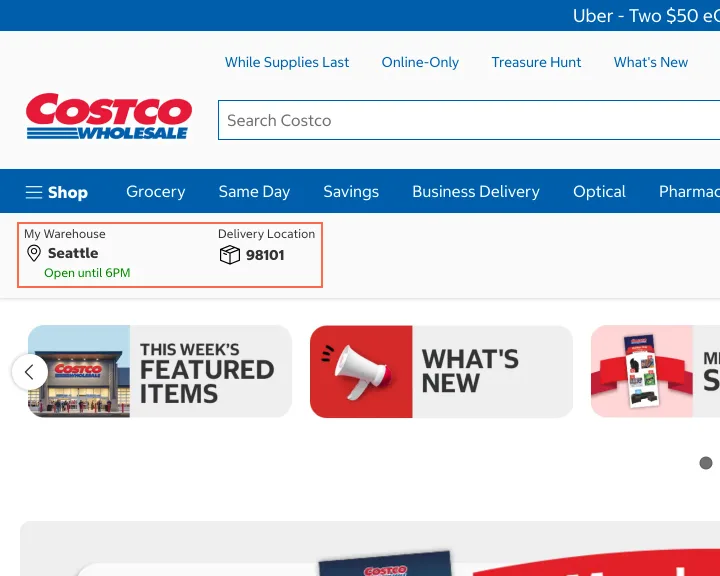
Seen from Toronto, pages show a Seattle warehouse and ZIP 98101 the visitor never chose
Observation
Viewed from Toronto, Canada, the home page was the US site, marked ‘US’ at the top right. Under the navigation it shows ‘My Warehouse Seattle, Open until 6PM’ and ‘Delivery Location 98101’, and the product page says ‘98101 Available’ and ‘Seattle In Stock’. The country menu lists Canada. No prompt about the location or country appeared on the first screen.
Implication
Stock, delivery and warehouse hours are shown for a place the visitor never picked. Someone outside that area can believe an item is available to them, or not notice that a site for their own country exists.
Recommendation
Label a guessed location as a guess (‘Showing Seattle. Change location’) until the visitor confirms it. When the visitor appears to be outside the US, offer the matching country site once, with a choice to stay. Keep the location visible in the header; it is the right place.
Measured
- Toronto visit shows Seattle warehouse, ZIP 98101
- Product page: '98101 Available', 'Seattle In Stock'
- 26 Oct: still ‘My Warehouse Seattle’ and ‘98101’, no prompt
Finding 2Low
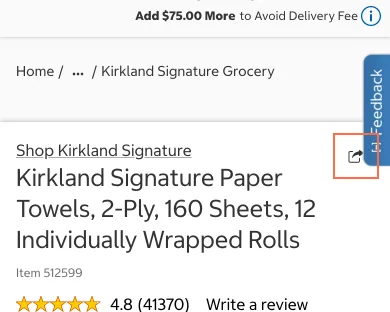
The fixed Feedback tab covers part of Share, Find and carousel buttons
Observation
The ‘Feedback’ tab, 35 by 112.7 px, is fixed to the right edge. At 390 px it covers 11 by 28.3 px of the product page’s Share button and 11 by 8.1 px of the store locator’s Find button. At 1440 px it covers 15 of the 36 px of the home carousel’s ‘Next promo’ button.
Implication
A tap near the edge of these buttons opens the feedback form instead. On a phone the tab covers the main column, where people tap most.
Recommendation
Leave the right edge free of controls by padding the content past the tab, or move the tab into the footer or the account menu on small screens. Check that no button is under it at the common widths.
Measured
- Feedback tab covers the Share button on a phone
- Overlap: 11 × 8.1 px (88.7 px²)
- Overlap: 15 × 36 px (540 px²)
Finding 3Best practice
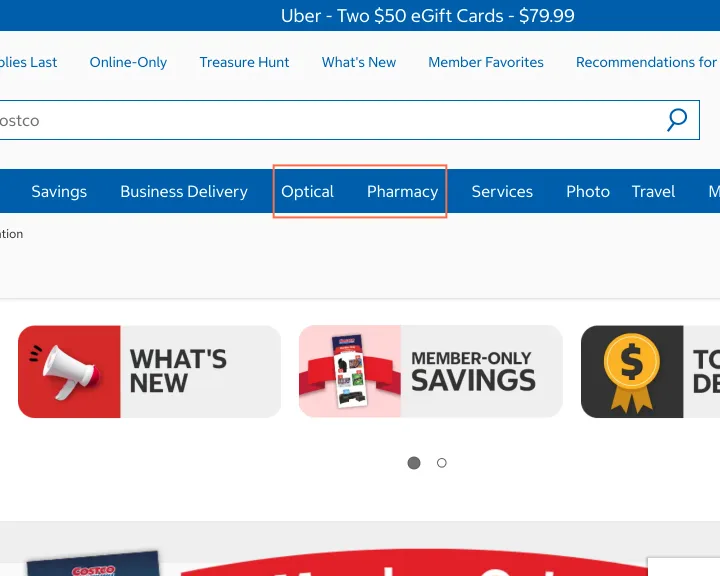
Four main navigation links open a new tab with no warning
Observation
In the blue navigation, Optical, Pharmacy, Photo and Travel open in a new tab, while Services, between them, and the rest do not. None has an icon, and none says so in its name. On the home page at desktop size the check found 11 such links, among them Investor Relations, Credit Card and Grocery by Instacart in the footer.
Implication
Items in one menu behave two ways. People who expect to stay in the tab lose the back button and end up with several Costco tabs, and screen reader users are not told the context changed.
Recommendation
Open main navigation links in the same tab. Where a new tab is kept, for a partner site, show a small new-tab icon and add ‘opens in a new tab’ to the link’s accessible name.
Measured
- Optical, Pharmacy, Photo, Travel open new tabs
- Photo: opens a new tab, no cue
- Travel: opens a new tab, no cue
- Investor Relations: opens a new tab, no cue
Finding 4Medium
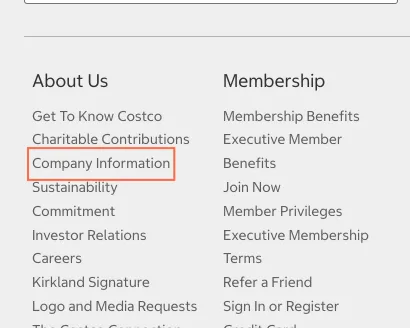
Product-card delivery links and footer links are under the 24 px target size
Observation
Ten ‘2-Day Delivery’ links in home page product cards are 20.8 px tall, and 55 of 61 footer links are 23.8 px tall with no gap: under the 24 px of WCAG 2.2 criterion 2.5.8 (AA). The 8 px buttons beside the navigation labels are keyboard duplicates: hovering a label opens the same menu, and on focus the button grows to 32 px, so the exception for an equivalent covers them.
Implication
People with a tremor, or using a touch screen, can miss a 20.8 px delivery link and open the product card instead. In the footer, a tap can land on the link above or below the one they meant.
Recommendation
Give the ‘2-Day Delivery’ links and the footer links at least 24 px of height, with padding, or 4 px of space between stacked links. Recheck with axe target-size at 1440, 820 and 390 px.
Measured
- Company Information: 23.8 px tall
- 26 Oct: 10 delivery links 20.8 px tall; 55 of 61 footer links 23.8 px, no gap
- axe target-size: 58 elements (serious)
Finding 5Medium
The price card stays titled ‘2-Day Delivery’ after In-Warehouse is chosen
Observation
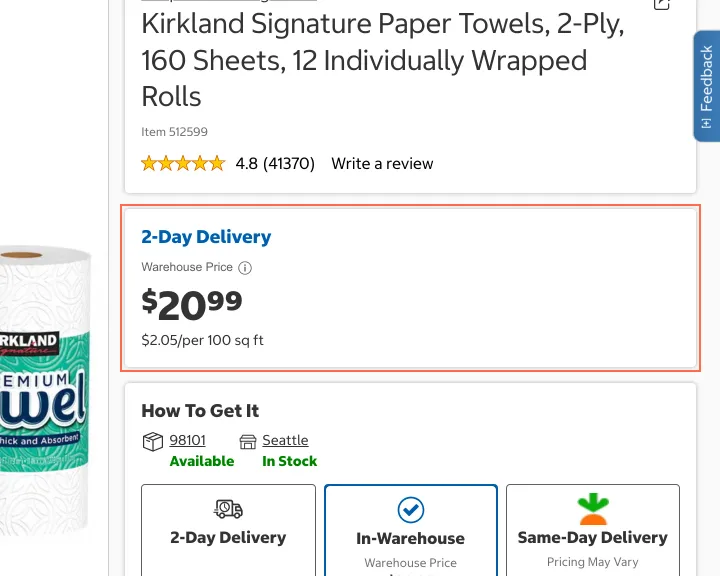
On the Kirkland paper towels page the price card reads ‘2-Day Delivery’, ‘Online Price $23.99’. After choosing the In-Warehouse tile it reads ‘Warehouse Price $20.99’ under the same ‘2-Day Delivery’ title. That title is a link, in blue with no underline, set as the card’s heading. The unit line reads ‘$2.05/per 100 sq ft’.
Implication
A shopper comparing ways to get the item sees a warehouse price under a delivery title and cannot be sure which price applies to which choice. A link set as a heading is not read as something to press.
Recommendation
Title the card after the selected tile (‘In-Warehouse’, ‘Same-Day Delivery’) and put the 2-Day Delivery link in body text with an underline. Write the unit price as ‘$2.05 per 100 sq ft’. Keep the price inside each tile; it makes the $3 difference plain.
Measured
- In-Warehouse chosen, card still titled 2-Day Delivery
- Links styled as headings: 1, e.g. "2-Day Delivery"
- 26 Oct: In-Warehouse pressed, card still titled ‘2-Day Delivery’
Finding 6Medium
At 374px the delivery-fee line makes the product page scroll sideways
Observation
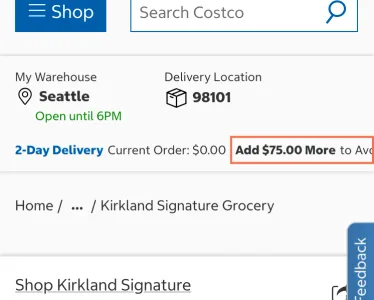
At 374 px wide the product page is 483 px wide, 109 px too wide, so it scrolls sideways; at 320 px, the width WCAG 1.4.10 is judged at, it is 484 px. The element past the edge is the header’s delivery line, which ran off as ‘Add $75.00 More to Avo’ in the capture. At 390 px the line wraps and fits. At 375 px the home page is 380 px wide.
Implication
On narrow phones the whole page can slide sideways under a thumb, and the fee message is cut mid-word. People lose their place and may miss how much more they need to spend.
Recommendation
Let the delivery line wrap at every width, as it already does at 390 px, or shorten it below 400 px (‘$75 more for free delivery’). Add a test at 320, 360 and 375 px that fails when the page is wider than the screen.
Measured
- Page 483 px wide in a 374 px viewport
- Page 380 px wide in a 375 px viewport
- 26 Oct at 320 px: page 484 px wide, fee line cut at x 458
Finding 7Low
Pressing Find with an empty field reports a failed search and clears the list
Observation
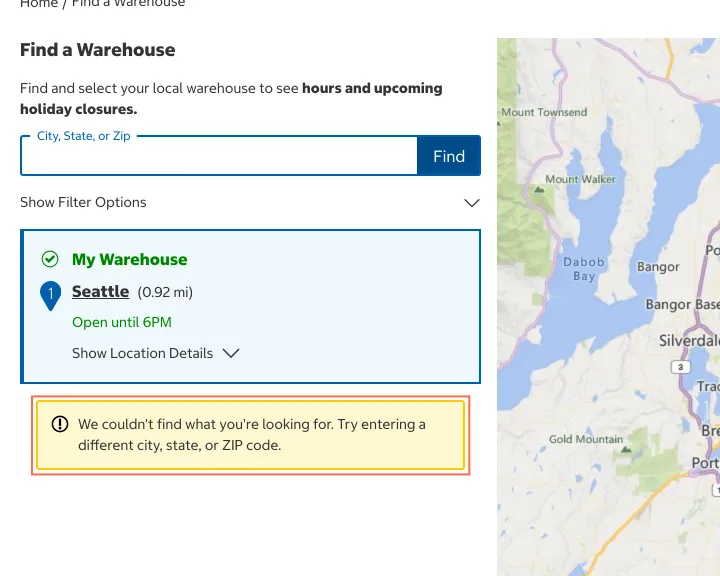
On Find a Warehouse, pressing Find with the ‘City, State, or Zip’ field empty shows ‘We couldn’t find what you’re looking for. Try entering a different city, state, or ZIP code.’ The list and the map then drop to the Seattle warehouse alone; the other nine pins, Tukwila among them, go.
Implication
Nothing was searched, yet the message says the search failed and asks for a different place. The nearby warehouses the page showed a moment before disappear, so the visitor loses what they had.
Recommendation
When the field is empty, keep the current results and say ‘Enter a city, state or ZIP code’ beside the field, linked to it with aria-describedby. Keep the ‘couldn’t find’ message for searches that ran and matched nothing.
Measured
- Empty Find: 'We couldn't find what you're looking for'
What was examined
- Home
- Search: paper towels
- Category: Paper & Plastic Products
- Product: Kirkland Signature Paper Towels
- Warehouse locator
- Sign in or register
- Warehouse savings
No real users were observed. Only public pages were examined, signed out, on the date shown, at the sizes listed. A browser took the measurements; the numbers are in each finding.
Automated checks
| Accessibility rules failed (axe) | 2 rules: 2 serious |
|---|---|
| Tap targets under 24 pixels | 138 |
| Links that open a new tab | 83 |
| Console errors on load | 4 |
The 2 rules, by impact, with the elements and pages each failed on
target-sizeseriousWCAG 2.5.8 Target Size (Minimum) (AA) · 343 elements on 6 pages: Home; Search: paper towels; Category: Paper & Plastic Products; Product: Kirkland Signature Paper Towels; Warehouse locator; Warehouse savings
color-contrastseriousWCAG 1.4.3 Contrast (Minimum) (AA) · 1 element on 1 page: Home
color-contrast: not counted against the level, because The failing node was the caption of a rotating Costco Travel promotion (4.39:1, 25 October); on 26 October no text on the page fails. Promotions rotate; re-check at the next capture.
Counted by the engine on every page examined, at all three sizes. The search and category pages were counted as the headless session was served them, a no-match page, not as a browser shows them.