UX heuristic analysis · Banks and insurers
Chase.com: a UX heuristic analysis
For Chase’s digital product team
- Assessed
- Published
- Examined
- 10 pages of chase.com at desktop (1440 px), tablet (820 px) and phone (390 px)
- Method
- 10 public pages of chase.com and creditcards.chase.com, read signed out at three sizes (1440 × 900, 820 × 1180, 390 × 844) in headless Chromium on 2026-10-25, with the engine's own resolver; measured with axe-core and the engine's own checks. Sign-in and account opening on secure.chase.com were not read: www.chase.com's robots.txt disallows them. creditcards.chase.com's robots.txt answered 403 to the engine, which then treated that site's pages as allowed. Fraud-check and analytics hosts that did not resolve or answer on ports 80 and 443 were not loaded; reviewed from Toronto, Canada
Summary
Chase.com hides CD rates behind a ZIP code prompt, and card rates on narrow screens
The CD page blurs its rates behind a ZIP code prompt that is not built as a dialog and does not close with its ×; on narrow screens the credit card list opens in a view with no APR or annual fee; and screen readers hear offers as '$200 Strike through $250'. Smaller: a 21 px password toggle in the sign-in box, a side menu that Escape does not close, and phone numbers that are not links. axe found 2 rules failing across 10 pages at 3 sizes. Seen from Toronto, Canada: the US site, asking for a ZIP code a Canadian visitor does not have.
Where to start
- Finding 8: CD rates stay blurred behind a ZIP code prompt that opens at every size Medium
- Finding 6: On narrow screens the card list opens in Grid view, without APR or annual fee Medium
- Finding 5: Screen readers hear 'Strike through' between old and new offers on the card list Medium
- Finding 2: The sign-in box's Show password button is 21 px tall at desktop size Medium
- Finding 7: The ZIP code prompt is not exposed as a dialog, and a page link paints over it Medium
| High | Medium | Low | Best practice |
|---|---|---|---|
| 0 | 6 | 2 | 1 |
The 9 findings
Findings about the whole site first, then each page in the order examined, the most severe first within each. The levels, high, medium, low, best practice, are explained on the method page.
Finding 1Low
Escape does not close the credit cards side menu
Observation
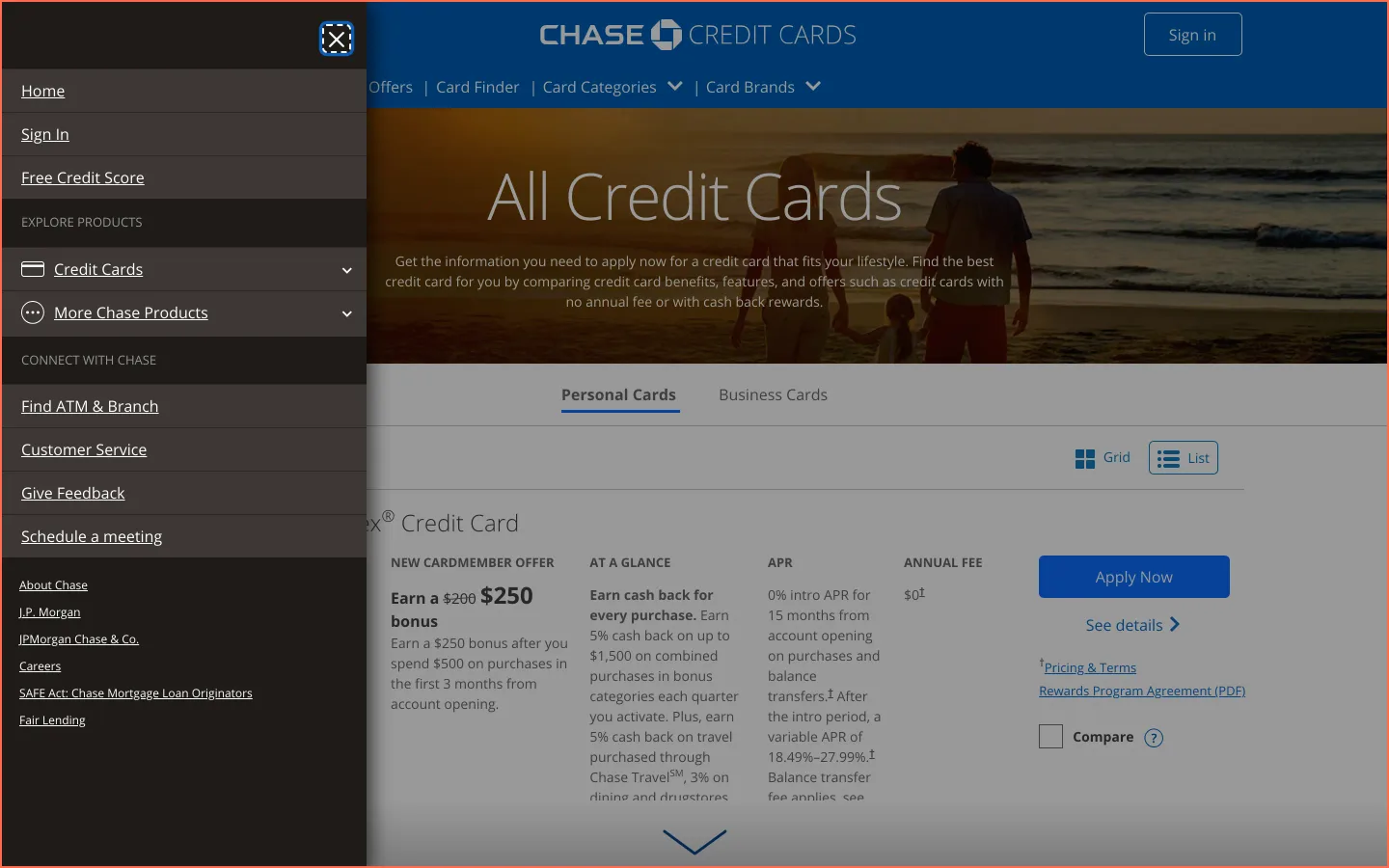
On All Credit Cards the side menu button is named 'Side menu ends Hamburger menu icon' and has no aria-expanded. The menu it opens covers the page with no dialog role or name, and pressing Escape leaves it open; its close button is at its top. This was seen at 1440 px in the capture and at 500 px on 26 October.
Implication
Keyboard users expect Escape to dismiss a menu or panel. Here they have to find the close control instead, and the menu button's name tells a screen reader user little about what it opens.
Recommendation
Close the menu on Escape and return focus to the button that opened it. Name the button 'Menu', with aria-expanded, and drop 'Side menu ends' and 'Hamburger menu icon' from its name.
Measured
- Side menu ends Hamburger…: Escape does not close
- 26 Oct: Escape leaves the side menu open; button has no aria-expanded
Finding 2Medium
The sign-in box's Show password button is 21 px tall at desktop size
Observation
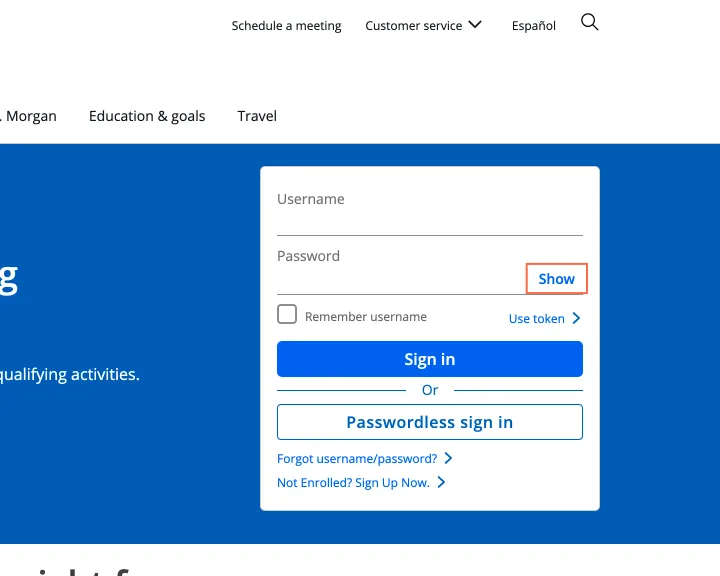
In the sign-in box on the home page at 1440 px, the 'Show' button in the password field, named 'Show Password' and with no aria-pressed, is 52.3 by 21.2 px, under the 24 by 24 px minimum, with another target within 12 px of its centre. axe target-size (WCAG 2.2 success criterion 2.5.8, level AA) fails on it.
Implication
People with a tremor, or using a laptop's touch screen, can miss the toggle and land in the password field instead, and stop checking what they typed before they sign in.
Recommendation
Give the toggle a hit area of at least 24 by 24 px, for example 8 px of vertical padding offset by a negative margin so the field does not move. Keep its name and add aria-pressed so 'shown' and 'hidden' are announced. Recheck with axe at 1440, 820 and 390 px.
Measured
- Show Password: 21.2 px tall
- axe target-size: 1 element (serious)
Finding 3Medium
Hidden slides in the checking page's article carousel still hold focusable links

Observation
The 'Read more about personal banking' carousel near the foot of Chase Total Checking marks slides 2 and 3 aria-hidden="true" while their links stay focusable; at 500 px all three slides are on screen. axe aria-hidden-focus (WCAG 2.2 success criterion 4.1.2, level A) fails on both. The image links are named from alt text misspelt 'Reard more about…'.
Implication
A keyboard user can tab onto links that are off screen, and a screen reader user onto links that are not announced, and lose track of where focus is. The misspelt name is read aloud as written.
Recommendation
Make the hidden slides inert, or set their links to tabindex='-1' and restore them when the slide shows. Correct the spelling, and give the image alt='' with the image link removed from the tab order, since the 'Read more' link beside it goes to the same article.
Measured
- Hidden slides keep links; name reads 'Reard more'
- axe aria-hidden-focus: 2 elements (serious)
- 26 Oct at 500 px: slides 2 and 3 on screen, aria-hidden, links tabbable
Finding 4Best practice
The fee schedule PDF opens a new tab with no warning, though Apply Now gives one
Observation
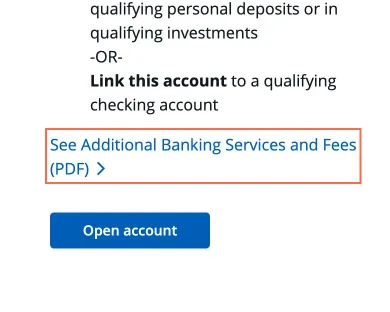
On Chase Total Checking, 'See Additional Banking Services and Fees (PDF)' opens in a new tab at all three sizes, with no new-tab icon and nothing in its name. On All Credit Cards the Apply Now links say so: 'Apply Now Opens Chase Freedom Flex application in new window'. Across the ten pages the check found 225 unannounced new-tab links over three sizes, most of them in footers.
Implication
People reading fees on a phone lose the back button and land in a separate PDF tab, and screen reader users are not told the context changed. The site announces a new window in one place and not in another.
Recommendation
Add 'PDF, opens in a new tab' to the name of the fees link, with a small icon, and the same wording to every link that sets target='_blank', as the credit card pages already do for Apply Now. Or open the PDF in the same tab.
Measured
- Fees PDF opens a new tab; Apply Now says so
- See Additional Banking Serv…: opens a new tab, no cue
Finding 5Medium
Screen readers hear 'Strike through' between old and new offers on the card list
Observation
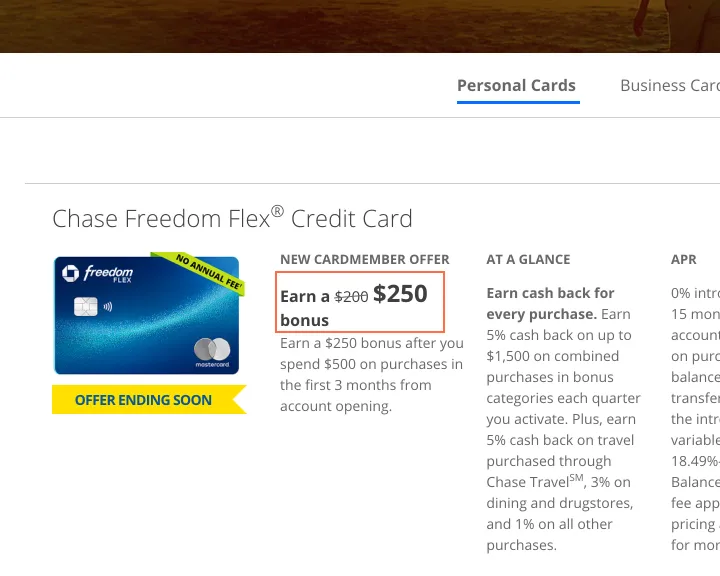
On All Credit Cards the first offer is read as 'Earn a $200 Strike through $250 bonus', and five other offers use the same wording. The 43 Compare boxes are named like 'empty checkbox Compare Compare the Chase Freedom Flex', and 'checkmark Comparing…' once ticked. In List view the APR column adds 81 links named 'Dagger Opens pricing and terms in new window'.
Implication
A listener cannot tell which figure is the offer, $200 or $250, and may expect the smaller bonus or the larger one wrongly. 'Empty checkbox' in a name can contradict the state the screen reader announces, and the repeated dagger links bury the APR they annotate.
Recommendation
Mark the old figure as removed with <del> and visually hidden text ('was $200, now $250'), or drop the old figure. Name each box 'Compare Chase Freedom Flex' and let its state speak for itself. Give each card one 'Pricing and terms, Chase Freedom Flex' link instead of a dagger link per line.
Measured
- Offer read as '$200 Strike through $250 bonus'
Finding 6Medium
On narrow screens the card list opens in Grid view, without APR or annual fee
Observation
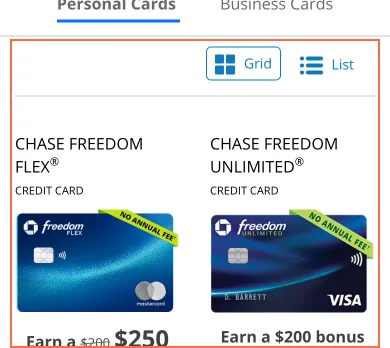
At 1000 px and wider All Credit Cards opens in List view, and each of its 43 cards has an APR and an Annual Fee column. At 820 and 390 px in the capture, and at 500 px on 26 October, it opens in Grid view: name, card art, the offer, Apply Now, See details and Compare, with no APR or annual fee on any card. Pressing List shows them.
Implication
Rate and fee are what most people compare cards on. On a phone they have to open each card's page, or find and try the List view, to learn them, and can apply for a card without having seen its rate.
Recommendation
Show the APR and the annual fee in every Grid card, one line each under the offer, or open the page in List view at every width. Lead the Compare view with the same two figures.
Measured
- Phone: Grid view, no APR or annual fee per card
- Desktop: List view with APR and Annual Fee columns
- 26 Oct at 500 px: Grid, no APR or fee on any card; List shows them
Finding 7Medium
The ZIP code prompt is not exposed as a dialog, and a page link paints over it
Observation
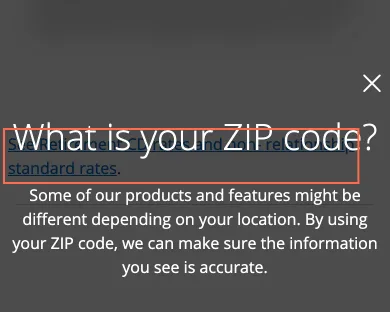
The prompt has no dialog role, aria-modal or name; its close is a link to '#' named 'close', 25 × 33.5 px. Main is aria-hidden while the header's links stay focusable: focus does not move into the prompt on load, and Tab from Next goes to 'Skip to main content' and the header. 'See Retirement CD rates…' is drawn over the overlay, across the heading at 390 px in the capture.
Implication
A screen reader user is not told that a dialog opened or that the rest of the page is shut, and can wander into the header while the rates stay hidden. On a phone the link and the heading overlap, and a tap meant for the prompt can land on the link.
Recommendation
Build the prompt as a modal dialog: role='dialog', aria-modal='true', named by its heading, with focus moved into it, kept there and returned on close. Make close a button named 'Close'. Stack the dialog above every layer of the page so nothing paints through it.
Measured
- Overlap: 346.4 × 46 px (15936.1 px²)
- ZIP prompt: no dialog role; close is a link to '#'
- 26 Oct: no dialog role; Tab leaves Next for the header
Finding 8Medium
CD rates stay blurred behind a ZIP code prompt that opens at every size
Observation
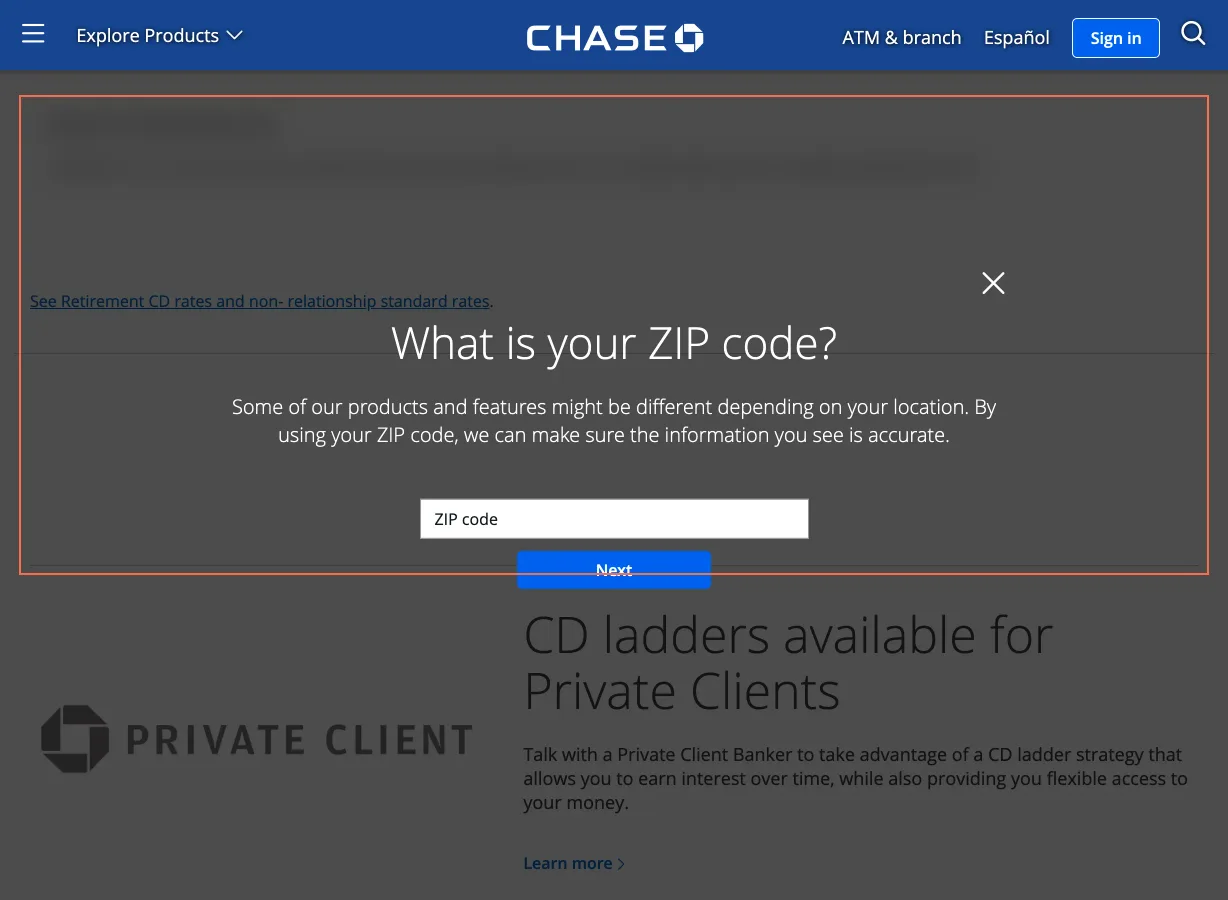
On the CD page a 'What is your ZIP code?' prompt opens over the page at every size, and the rates block behind it is blurred. Pressing × does not close it: it becomes 'Are you sure?' with the ZIP field, Next and 'Return to homepage', and no ×. No rate is in the page until a ZIP code is given. The mortgage rates page shows example rates for ZIP 60629 without asking.
Implication
The page exists to show CD rates, and a visitor must hand over a location before seeing one. People who would rather not, or who have no US ZIP code, such as a visitor in Canada, can leave without a figure to compare.
Recommendation
Show rates for a stated example ZIP code first, as the mortgage rates page does ('Rates for 10001. Change'), and put the ZIP field inline above the table. Do not blur the rates behind the question. Make sure closing the prompt leaves the rates readable.
Measured
- CD rates blurred behind 'What is your ZIP code?'
- 26 Oct: × opens 'Are you sure?', no ×; no rate is in the page
- Overlap: 1180 × 66 px (77880 px²)
- Mortgage rates: example for 60629 shown without asking
Finding 9Low
Customer service phone numbers are plain text on a phone, not links to call
Observation
At 390 px the Customer Service page lists 'Personal Banking Customer Service: 1-800-935-9935', 'Auto Customer Service: 1-800-336-6675', 'Call Chase Customer Service: 1-800-935-9935' and others as paragraphs. None of the page's links is a tel: link, at any of the three sizes.
Implication
On a phone, the device people would call from, they have to copy or memorise a number and switch apps to call it.
Recommendation
Wrap each number in a tel: link named for its purpose ('Call Personal Banking, 1-800-935-9935') and keep the number visible as text. Do the same under 'Still have questions?' and 'Military personnel and veterans'.
Measured
- Phone numbers are plain text, no tel: links
What was examined
- Home
- Checking: Chase Total Checking
- Credit card comparison: all credit cards
- Rates: CDs
- Mortgage rates
- Branch and ATM locator
- Customer service
- Fees and disclosures
- Mobile app
- Accessibility
No real users were observed. Only public pages were examined, signed out, on the date shown, at the sizes listed. A browser took the measurements; the numbers are in each finding.
Automated checks
| Accessibility rules failed (axe) | 2 rules: 2 serious |
|---|---|
| Tap targets under 24 pixels | 2 |
| Links that open a new tab | 80 |
| Console errors on load | 25 |
The 2 rules, by impact, with the elements and pages each failed on
aria-hidden-focusseriousWCAG 4.1.2 Name, Role, Value (A) · 2 elements on 1 page: Checking: Chase Total Checking
target-sizeseriousWCAG 2.5.8 Target Size (Minimum) (AA) · 1 element on 1 page: Home
Counted by the engine on every page examined, at all three sizes.