UX heuristic analysis · Retail
Amazon.com: a UX heuristic analysis
For Amazon’s digital product team
- Assessed
- Published
- Examined
- 4 pages of amazon.com at desktop (1440 px) and phone (375 px)
- Method
- 4 pages, read by hand at two sizes (1440 × 900, 375 × 812) in Safari on 19 October 2026, after the site’s bot protection refused the crawl; reviewed from Toronto, Canada
Summary
Amazon.com’s size tiles, unit price type and phone Sort control make comparing hard
Comparing is where it fails: size tiles mix counts, the unit price is set in 10px type, nothing sorts by unit price, and on a phone the Sort control is the last item in an icon-only filter sheet. Smaller issues are a quantity box drawn over an invisible select, an app banner with a 7px dismiss and a help page with no contact route. Amazon opens a ‘Skip to’ panel on the first Tab and draws a clear focus ring, its All menu opens on Enter, moves focus into each level and returns it on Escape, and the phone buy box is large and most paper towel cards print a unit price. All checks were made signed out, from Canada; shipping and delivery details were left out.
Where to start
- Finding 6: Size tiles mix rolls, sheets and packs, and print the unit price at 10px Low
- Finding 4: On the phone, Sort by is the last item in an icon-only Filters sheet Low
- Finding 3: Cards show a unit price, but sort and filters cannot use it Low
- Finding 7: On a phone the product page opens with an ad, and the price needs a scroll Low
- Finding 5: The visible quantity control is a decoy; the real select is invisible and 33 px wide Medium
| High | Medium | Low | Best practice |
|---|---|---|---|
| 0 | 3 | 5 | 0 |
The 8 findings
Findings about the whole site first, then each page in the order examined, the most severe first within each. The levels, high, medium, low, best practice, are explained on the method page.
Finding 1Medium
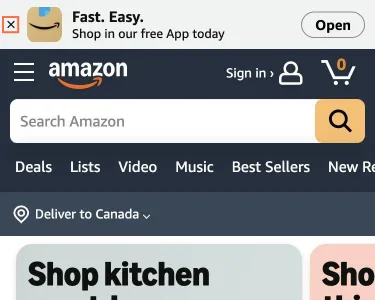
The phone app banner is on every page, and its close mark is 7px
Observation
A 49 px banner, ‘Fast. Easy. Shop in our free App today’, tops the home, results and product pages. Its dismiss is an i element with role='close', tabindex -1, no accessible name, drawn 7.2 by 7.2 px. The ‘Open’ button is 64 by 27 px. axe reports aria-roles on the dismiss.
Implication
Shoppers meet the banner on every page, and a thumb cannot hit a 7px dismiss. Assistive technology cannot find it, name it or give its role.
Recommendation
Make the dismiss a button named ‘Close app banner’ with a target of at least 24 by 24 px, ideally 44. Remember a dismissal for the session so the banner does not return on each page.
Measured
- App banner: dismiss is a 7.2px <i role=close>, no name
Finding 2Low
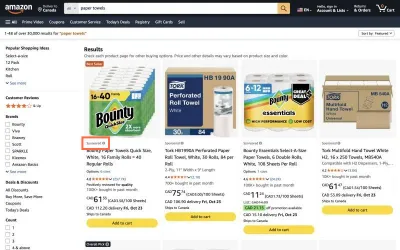
The first row of results is all ads, labelled in 11px type
Observation
For ‘paper towels’ the first four cards are all marked ‘Sponsored’, and 12 of the first 22 cards are. The label is 11px, 67 by 13 px, above the title with an info icon. The first organic card is the fifth.
Implication
At 11px the label is easy to miss, so a shopper reads paid placement as Amazon’s own ranking.
Recommendation
Raise the label to 12 or 13px and give it a tag shape. Limit sponsored cards in the first row, or group them in a labelled band so organic results start higher.
Measured
- First row all 'Sponsored'; label 11px; 12 of first 22 are ads
Finding 3Low
Cards show a unit price, but sort and filters cannot use it
Observation
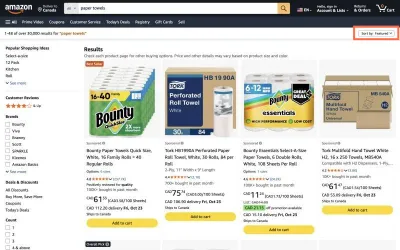
52 of 60 cards state a price per 100 sheets. Sort by offers Featured, Price: Low to High, Price: High to Low, Avg. Customer Review, Newest Arrivals and Best Sellers. Nothing sorts by unit price. The cards also mix Quick Size, Select-A-Size, Choose-A-Sheet and 11 by 9 in towels under one per-sheet unit.
Implication
Price: Low to High ranks by pack total, so a small pack beats better value. A shopper compares unit prices by eye, across sheets that are not one size.
Recommendation
Add ‘Price per unit: Low to High’ to Sort by wherever most cards carry a unit price. Note sheet size next to the unit, or compare by area. Keep the ‘/100 Sheets’ format, which already helps.
Measured
- Sort select has six options, none for unit price
- Unit price per 100 Sheets on 52 of 60 cards; sheet sizes differ
Finding 4Low
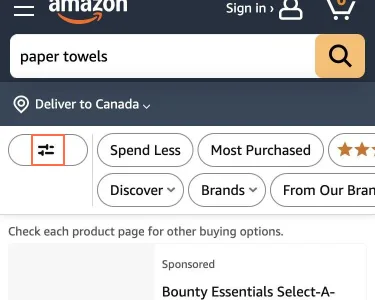
On the phone, Sort by is the last item in an icon-only Filters sheet
Observation
The results page has no sort control. The only entry is a button with a sliders icon and no text (accessible name ‘All Filters Icon’, 24 by 22 px). In the sheet, ‘Sort by’ is the twelfth item in the left list, just below the clipped edge, and shows only after scrolling that list.
Implication
Sorting is a core step in comparing products. Many shoppers will not look behind an unlabelled icon, then scroll a list to its end.
Recommendation
Add a visible ‘Sort’ button next to ‘Filters’, and give the filter button a text label. Or move ‘Sort by’ to the top of the sheet. Keep the two-pane sheet and the ‘Show N results’ button, which work well.
Measured
- Phone results: Filters is an icon-only button; no sort on the page
- Filters sheet: 'Sort by' is the 12th item, below the visible list
- 'Sort by' appears only after scrolling the category list
Finding 5Medium
The visible quantity control is a decoy; the real select is invisible and 33 px wide
Observation
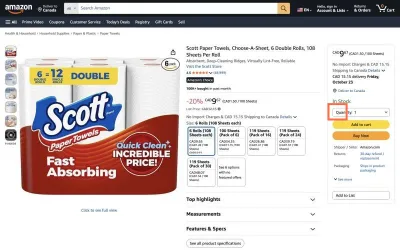
In the buy box the quantity control a shopper sees, 206 × 32 px, is an aria-hidden span that takes no focus; the select that sets the quantity is drawn at opacity 0.01, 33 × 27 px, over part of it. On 19 October the select had no label, and axe reported select-name at 1440 and 375 px. On 26 October it has one: ‘Quantity:’.
Implication
The box on screen does not take input, and the select that does is almost invisible. A label, style or focus fix made to the visible box does not reach the control people use.
Recommendation
Style the native select to look like the box, or make the visible box the control, with a role, a name and a value. Keep the ‘Quantity:’ label tied to it, and check that focus is drawn on what is visible.
Measured
- 26 Oct: select labelled ‘Quantity:’, opacity 0.01 and 33 × 27 px under a decoy
- Quantity select: its label is aria-hidden; axe select-name
- Phone quantity select: same aria-hidden label; axe select-name
Finding 6Low
Size tiles mix rolls, sheets and packs, and print the unit price at 10px
Observation
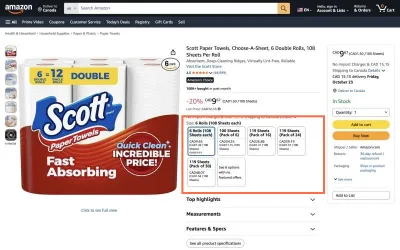
The tiles read ‘6 Rolls (108 Sheets each)’, ‘100 Sheets (Pack of 6)’, ‘119 Sheets (Pack of 16)’ and so on. The first counts rolls; the others give a sheet count and a pack size without saying whether the sheets are per roll or in total. The unit price line in each 100 by 108 px tile is 10px.
Implication
A shopper must decode each count before comparing. The figure that decides the purchase is the smallest type on the tile.
Recommendation
Use one label pattern, such as ‘Pack of 6 rolls, 100 sheets each’. Set the unit price at 12px or larger, on the same line in every tile. Keep the selected-state border and fill, which read clearly.
Measured
- Size tiles mix rolls and sheets; unit price line is 10px
Finding 7Low
On a phone the product page opens with an ad, and the price needs a scroll
Observation
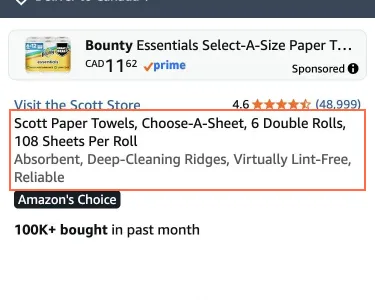
At 375 by 812 the first screen holds the app banner, header, search, delivery row, a ‘Sponsored’ ad for another brand, then the title at y 287 and a large image. The price block starts at y 1130 and ‘Add to cart’ at y 1418, about 1.4 and 1.75 screens down.
Implication
A rival’s ad meets the shopper before the chosen product does, and the price waits below the image. Both slow the buying decision.
Recommendation
Move the ad below the buy box. Show price and unit price beside the title, or shrink the image so the price lands on the first screen. Keep the buy box itself: its 345 by 42 px buttons and 347 by 48 px quantity control are comfortable.
Measured
- Phone product page: ad above the title; price off the first screen
- Phone price at page y 1130; Add to cart y 1418; large buttons
Finding 8Medium
‘Help & Contact Us’ offers no contact route when signed out
Observation
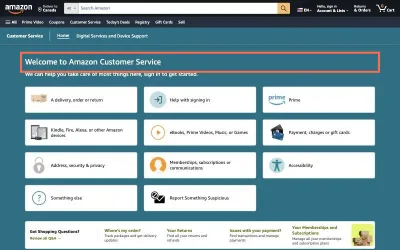
The tab says ‘Help & Contact Us’. The page says ‘We can help you take care of most things here, sign in to get started.’ Nine topic tiles follow, and the text has no phone, chat or ‘Contact us’ option. ‘Search our help library’ is 1,050 px down the page, while the header box says ‘Search Amazon’.
Implication
Someone who cannot sign in, or whose problem fits no tile, sees no next step. The first search box they find searches products.
Recommendation
Show a ‘Contact us’ route above the fold, or say plainly that it appears after sign in. Place ‘Search our help library’ directly under the welcome text. Keep the plain topic tiles and the ‘Take Quick Actions’ list.
Measured
- Help page: nine topic tiles, 'sign in to get started', no contact option
- Help search is 1,050 px down the page; header search is for products
What was examined
No real users were observed. Only public pages were examined, signed out, on the date shown, at the sizes listed. A browser took the measurements; the numbers are in each finding.
Automated checks
| Accessibility rules failed (axe) | not measured: pages were read by hand |
|---|---|
| Tap targets under 24 pixels | 66 |
| Links that open a new tab | 2 |
| Console errors on load | 2 |
Counted by hand in the browser after the crawl was refused; no machine output was saved. Axe has not been run on these pages yet: the site's bot protection refused automated capture. The axe results will be added from a capture made in a person's own browser.